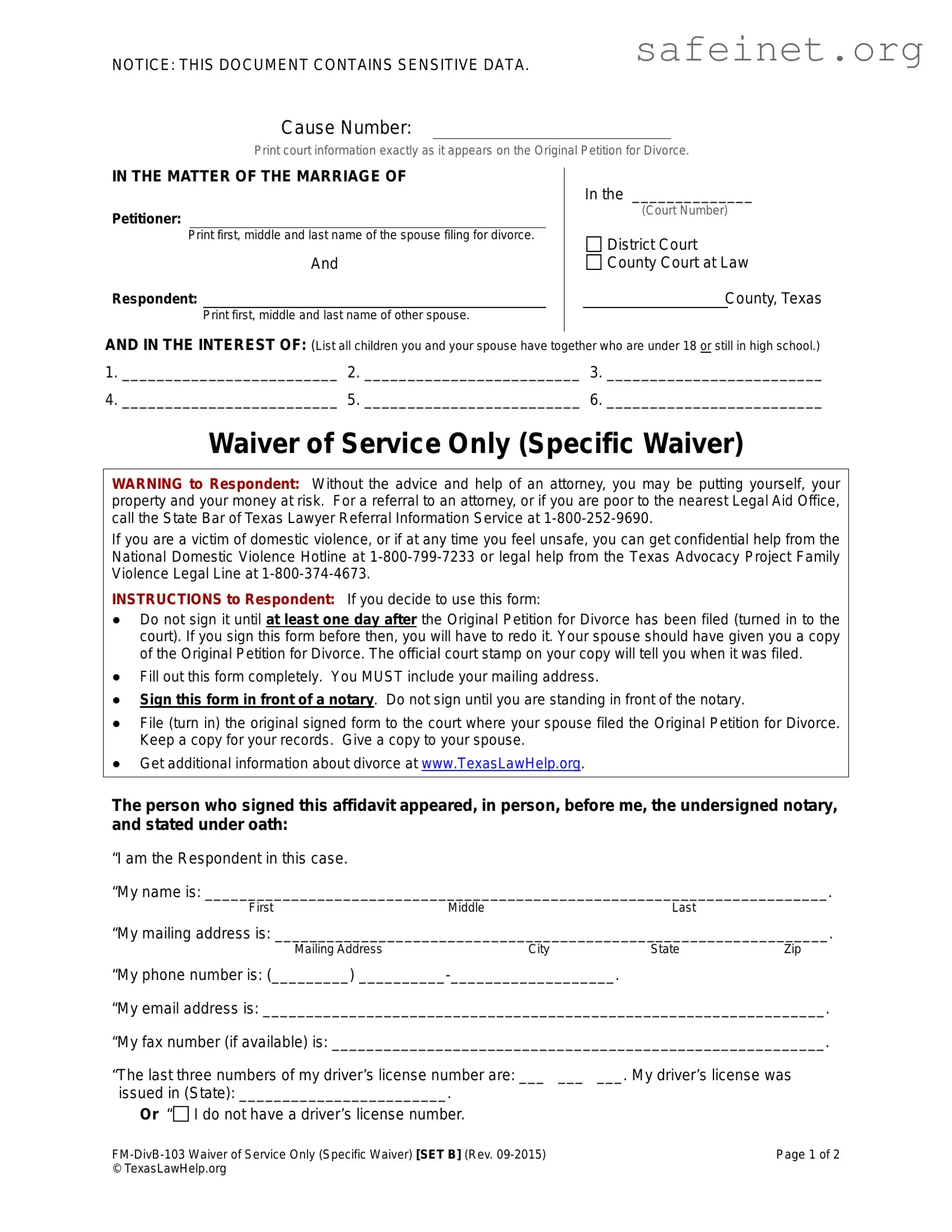
The Waiver Service form is an essential document in the divorce process, particularly for individuals seeking to simplify their legal proceedings. This form allows the spouse receiving the divorce petition, known as the Respondent, to waive their right to formal service of the Original Petition for Divorce. By doing so, the Respondent acknowledges their awareness of the divorce filing and agrees to proceed without the need for a court-appointed process server. Key components of the form include personal information such as the names and addresses of both spouses, a list of any minor children involved, and specific statements that the Respondent must understand and agree to. Notably, the form contains a warning advising the Respondent to consider legal counsel before signing, highlighting the potential risks associated with waiving formal notice. Additionally, it outlines the steps the Respondent must follow, including signing the form in front of a notary, filing it with the court, and keeping copies for their records. The Waiver Service form ultimately streamlines the divorce process while ensuring that both parties are informed and have agreed to the terms laid out in the petition.

NOTICE: THIS DOCUMENT CONTAINS SENSITIVE DATA.
Cause Number:
Print court information exactly as it appears on the Original Petition for Divorce.
IN THE MATTER OF THE MARRIAGE OF |
In the ______________ |
|
|
|
|
Petitioner: |
(Court Number) |
|
|
||
|
Print first, middle and last name of the spouse filing for divorce. |
□ District Court |
|
|
|
|
And |
□ County Court at Law |
Respondent: |
County, Texas |
|
Print first, middle and last name of other spouse.
AND IN THE INTEREST OF: (List all children you and your spouse have together who are under 18 or still in high school.)
1._________________________ 2. _________________________ 3. _________________________
4._________________________ 5. _________________________ 6. _________________________
Waiver of Service Only (Specific Waiver)
WARNING to Respondent: Without the advice and help of an attorney, you may be putting yourself, your property and your money at risk. For a referral to an attorney, or if you are poor to the nearest Legal Aid Office, call the State Bar of Texas Lawyer Referral Information Service at
If you are a victim of domestic violence, or if at any time you feel unsafe, you can get confidential help from the National Domestic Violence Hotline at
INSTRUCTIONS to Respondent: If you decide to use this form:
●Do not sign it until at least one day after the Original Petition for Divorce has been filed (turned in to the court). If you sign this form before then, you will have to redo it. Your spouse should have given you a copy of the Original Petition for Divorce. The official court stamp on your copy will tell you when it was filed.
●Fill out this form completely. You MUST include your mailing address.
●Sign this form in front of a notary. Do not sign until you are standing in front of the notary.
●File (turn in) the original signed form to the court where your spouse filed the Original Petition for Divorce. Keep a copy for your records. Give a copy to your spouse.
●Get additional information about divorce at www.TexasLawHelp.org.
The person who signed this affidavit appeared, in person, before me, the undersigned notary, and stated under oath:
“I am the Respondent in this case.
“My name is: ________________________________________________________________________.
FirstMiddleLast
“My mailing address is: ________________________________________________________________.
Mailing AddressCityStateZip
“My phone number is: (_________)
“My email address is: _________________________________________________________________.
“My fax number (if available) is: _________________________________________________________.
“The last three numbers of my driver’s license number are: ___ ___ |
___. My driver’s license was |
issued in (State): ________________________. |
|
Or “□ I do not have a driver’s license number. |
|
Page 1 of 2 |
|
© TexasLawHelp.org |
|

“The last three numbers of my social security number are: ___ ___ ___. Or “□ I do not have a social security number.
“I have been given a copy of the Original Petition for Divorce filed in this case. I have read the Original Petition for Divorce and understand what it says. I do not give up my right to review a different Petition for Divorce if it gets changed (amended).
“I understand that I have the right to be given a copy of the Original Petition for Divorce by a constable, sheriff or other official process server (legal notice). I do not want to be given legal notice. I give up my right to legal notice.
“I ask that the Court not enter any orders in this case unless the order is signed by me or unless I have received prior written notice of the date, time, and place of hearing.
“If I reach an agreement and sign a Final Decree of Divorce, the court can enter the Decree without me being present and without giving me notice. If I sign an agreed Final Decree of Divorce, I do not want a court reporter to make a record of the testimony.
“I understand that by signing this form I am entering an appearance in this case. I agree that a Judge or Associate Judge in the county and state where this case is filed may make decisions about my divorce, even if the divorce should have been filed in another county.
“I understand that I must let the Court and my spouse’s attorney (or my spouse if s/he is not represented by an attorney) know in writing if my mailing address or email address changes during this case. If I don’t, then I understand that any notices about this case will be sent to me at the mailing address or email address on this form.
Military Status (Check one box.)
“□ I am not in the military.
“□ I am in the military. I agree to the provisions stated above and I waive only the rights, privileges, and exemptions I have under the Servicemember’s Civil Relief Act that are contrary to those provisions.
Name Change (Check one box.)
“□ I am NOT asking the court to change my name.
“□ I ask the Court to change my name back to a name I used before my marriage. I am not asking the court to change my name to avoid criminal prosecution or creditors.”
_________________________________________________________________________________________
First |
Middle |
Last |
►
Signature of Respondent (Do NOT sign until you are in front of a notary.)
Notary fills out below.
State of
(Print name of state where this Affidavit is notarized)
County of
(Print the name of the county where this Affidavit is notarized)
Date
Sworn to and subscribed before me, the undersigned notary, on this date: |
|
/ |
/ |
|||
at |
|
a.m./p.m. |
Month |
day |
year |
|
|
|
|
|
|||
|
time |
|
circle one |
|
|
|
by
(Print name of person who is signing this Affidavit. NOT the notary’s name.)
[Notary Stamps Here ] |
|
|
|
|
|||
|
Page 2 of 2 |
||
© TexasLawHelp.org |
|
|
|
| Fact Name | Description |
|---|---|
| Purpose | The Waiver Service form allows a respondent in a divorce case to waive their right to receive formal legal notice of the proceedings. |
| Governing Law | This form is governed by Texas Family Code, specifically related to divorce proceedings. |
| Filing Requirement | The respondent must file this form with the court where the Original Petition for Divorce was submitted. |
| Notarization | The respondent must sign the form in front of a notary public to validate it. |
| Children's Information | Respondents are required to list all children under 18 or still in high school that they have with their spouse. |
| Legal Advice Warning | The form includes a warning advising respondents to seek legal advice before signing to avoid jeopardizing their rights. |
| Address Requirement | Respondents must provide their mailing address on the form to ensure they receive any future notices. |
| Military Status | Respondents must indicate their military status, which may affect their rights under the Servicemembers Civil Relief Act. |
Once you've gathered all the necessary information, you're ready to fill out the Waiver Service form. Completing this form accurately is essential, as it will help streamline the divorce process. Make sure to double-check all entries before submitting.
After you submit the form, you can access additional resources about divorce at www.TexasLawHelp.org. This can provide further guidance and support as you navigate through this process.
What is the Waiver Service form?
The Waiver Service form is a legal document used in divorce proceedings. It allows the respondent (the spouse who did not file for divorce) to waive their right to be formally served with the divorce papers. By signing this form, the respondent acknowledges receipt of the Original Petition for Divorce and agrees to the terms outlined in the document.
Who should use the Waiver Service form?
This form is intended for individuals who have been served with a divorce petition but wish to expedite the process by waiving formal service. It is crucial for the respondent to understand their rights and the implications of signing this form before proceeding.
What information is required on the form?
The Waiver Service form requires specific information, including the cause number, names of both spouses, and details about any children involved. Additionally, the respondent must provide their mailing address, phone number, email address, and the last three digits of their driver’s license and social security numbers, if applicable.
What are the risks of signing the Waiver Service form?
Signing the Waiver Service form without legal advice can pose risks. The respondent may be giving up their right to be formally notified about court proceedings. This could lead to decisions being made in their absence, which may not align with their interests. It is advisable to consult an attorney before signing.
When should the respondent sign the form?
The respondent should not sign the Waiver Service form until at least one day after the Original Petition for Divorce has been filed with the court. Signing the form before this time may require the respondent to complete a new form.
What should the respondent do after signing the form?
After signing the Waiver Service form in front of a notary, the respondent must file the original signed document with the court where the divorce was filed. It is also important to keep a copy for personal records and provide a copy to the spouse.
Can the respondent change their mind after signing?
Once the Waiver Service form is signed and filed, the respondent has waived their right to formal notice of the divorce proceedings. However, they can still participate in the divorce process and may seek legal counsel if they have concerns or wish to contest any issues.
What if the respondent is a victim of domestic violence?
If the respondent is a victim of domestic violence, it is crucial to seek help before proceeding with the Waiver Service form. Confidential support is available through resources like the National Domestic Violence Hotline. Legal assistance is also recommended to ensure safety and protection of rights.
Where can the respondent find more information about divorce?
For additional information about divorce processes and resources, respondents can visit www.TexasLawHelp.org. This website provides guidance on various legal matters, including divorce, and can help individuals understand their rights and options.
Incorrect Cause Number: Failing to print the court information exactly as it appears on the Original Petition for Divorce can lead to delays or rejections.
Missing Spouse's Full Name: Not including the full first, middle, and last name of the spouse filing for divorce can create confusion.
Omitting Children’s Names: Forgetting to list all children under 18 or still in high school can complicate the process.
Signing Early: Signing the form before at least one day after the Original Petition has been filed can invalidate the form.
Incomplete Mailing Address: Not providing a complete mailing address means you may miss important notifications.
Notarization Issues: Signing the form without the presence of a notary can render it invalid.
Failing to File Properly: Not turning in the original signed form to the correct court can lead to delays.
Ignoring Legal Advice: Not seeking legal counsel when needed can result in overlooking important rights.
Not Updating Contact Information: Failing to inform the court and spouse about changes in mailing or email addresses can lead to missed communications.
Not Understanding Rights: Not fully reading or understanding the Original Petition for Divorce can result in unintended waivers of rights.
When navigating the complexities of divorce proceedings, several forms and documents often accompany the Waiver Service form. Each of these plays a crucial role in ensuring that all parties understand their rights and obligations. Here’s a brief overview of some essential documents that may be used alongside the Waiver Service form.
Understanding these documents can significantly ease the divorce process. Each form serves a distinct purpose, helping both parties navigate their rights and responsibilities effectively. Being informed is a powerful tool in ensuring a smoother transition during such a challenging time.
The Waiver of Service form is similar to the Affidavit of Waiver of Service. Both documents allow a respondent in a divorce case to waive their right to receive formal notice of the divorce proceedings. The Affidavit of Waiver of Service includes a statement confirming that the respondent has received a copy of the Original Petition for Divorce and understands its contents. Like the Waiver of Service, it requires the respondent to provide personal information and sign in front of a notary, ensuring that the waiver is legally binding.
Another similar document is the Answer to Petition for Divorce. This form is filed by the respondent to formally respond to the divorce petition. While the Waiver of Service indicates that the respondent is waiving the right to be served, the Answer provides a chance to contest or agree to the terms presented in the petition. Both documents require the respondent's personal information and must be filed with the court, but the Answer allows for more detailed responses regarding the divorce terms.
The Consent to Divorce form is also akin to the Waiver of Service. This document is used when both parties agree to the divorce and its terms. It simplifies the process by allowing the respondent to consent to the divorce without further legal proceedings. Similar to the Waiver of Service, it requires signatures from both parties and may need notarization, ensuring that both spouses are in agreement about moving forward with the divorce.
The Joint Petition for Divorce shares similarities with the Waiver of Service as well. In this document, both spouses file together to initiate the divorce process. It indicates mutual agreement and understanding of the divorce terms. Like the Waiver of Service, it requires personal information from both parties and emphasizes that they are both aware of the proceedings and have chosen to proceed without formal service of process.
The Motion for Default Judgment is another document that relates to the Waiver of Service. This motion is filed when one spouse does not respond to the divorce petition, allowing the other spouse to request a judgment in their favor. While the Waiver of Service indicates that the respondent is waiving their right to be served, the Motion for Default Judgment addresses situations where that right is not exercised, leading to a potential default in the case.
The Notice of Hearing is similar in that it informs the parties of upcoming court proceedings. While the Waiver of Service allows a respondent to waive formal notice, the Notice of Hearing serves to provide information about scheduled court dates. Both documents are essential for ensuring that all parties are aware of the legal process, though they serve different purposes within that process.
The Final Decree of Divorce is also related to the Waiver of Service. This document finalizes the divorce and outlines the terms agreed upon by both parties. If the Waiver of Service is signed, it indicates that the respondent does not require further notice and consents to the final terms without being present in court. Both documents signify the progression of the divorce process and the respondent's acknowledgment of the proceedings.
Lastly, the Temporary Orders form is similar to the Waiver of Service in that it addresses immediate issues that may arise during the divorce process. This form can establish temporary arrangements regarding child custody, support, and property division while the divorce is pending. While the Waiver of Service allows a respondent to waive formal notice, the Temporary Orders form ensures that both parties understand and agree to temporary measures until the divorce is finalized.
When filling out the Waiver Service form, there are important steps to follow. Here’s a list of things you should and shouldn’t do:
Following these guidelines can help ensure that the process goes smoothly. Take your time and review the form carefully before submitting it.
Many people believe that the Waiver Service form is not necessary. However, if you are the Respondent in a divorce case, this form is crucial. It allows you to waive the formal service of the Original Petition for Divorce, which can streamline the process.
Some individuals think they can sign the Waiver Service form at any time. In reality, you must wait at least one day after the Original Petition for Divorce has been filed. Signing it too early means you will need to redo the form.
It is a common misunderstanding that providing a mailing address is not necessary. In fact, you must include your mailing address on the form. This ensures that all future communications regarding the case reach you.
Some people think they can sign the Waiver Service form without the presence of a notary. However, it is essential to sign the form in front of a notary. This step verifies your identity and the authenticity of your signature.
Many individuals assume that they can fill out the form however they like. It is important to follow the instructions carefully. Failing to complete the form as directed can lead to delays or complications in your divorce proceedings.
Filling out and using the Waiver Service form is an important step in the divorce process. Here are some key takeaways to keep in mind:
By keeping these points in mind, you can navigate the process more smoothly and ensure that your rights are protected.