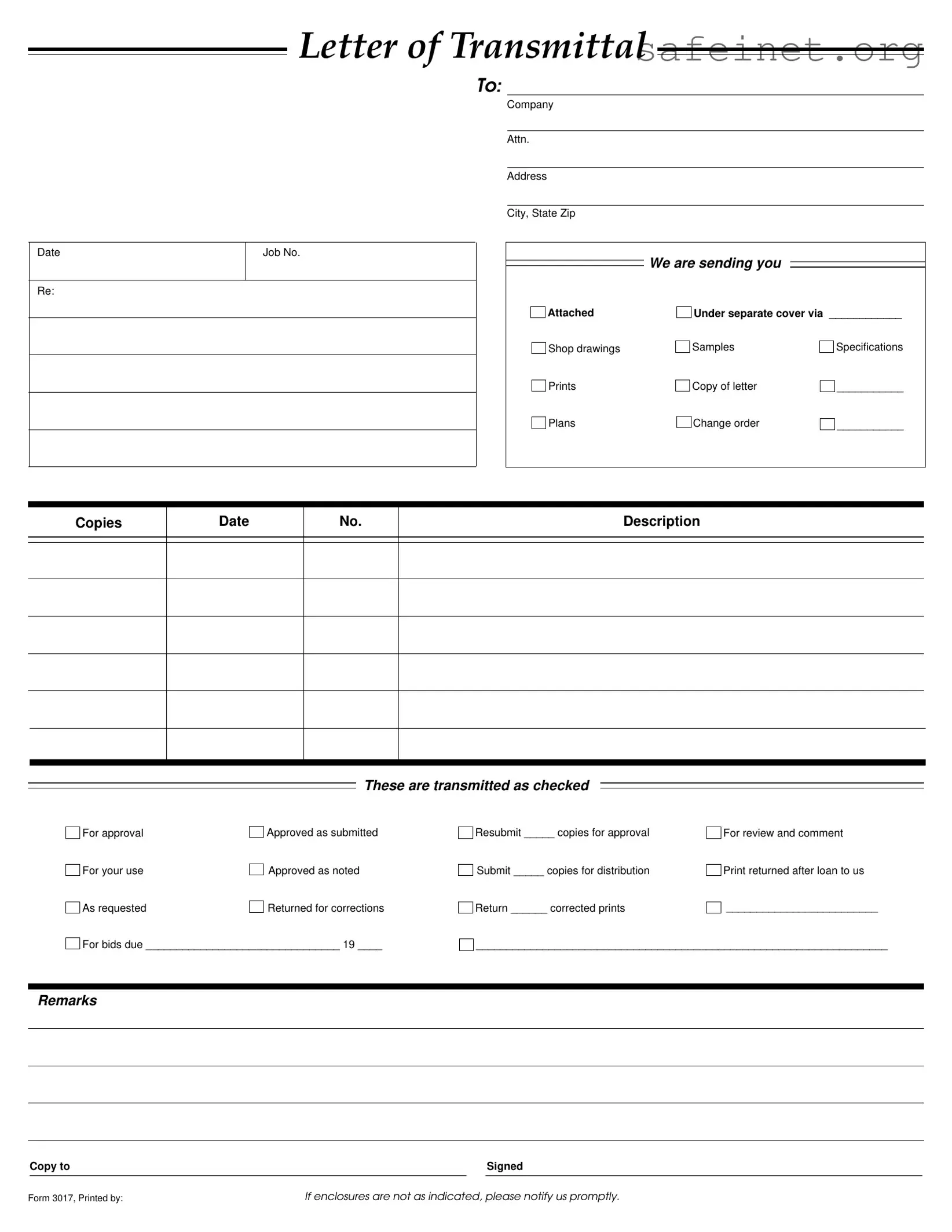
The Transmittal form serves as an essential tool in the communication process between parties involved in a project, ensuring that important documents are delivered accurately and efficiently. This form typically includes key details such as the date, job number, and the recipient's information, allowing for clear identification of the materials being sent. Alongside the basic information, the Transmittal form lists the specific documents included in the transmission, which may range from shop drawings and samples to specifications and plans. Each item is checked off to indicate its status, whether it is approved, returned for corrections, or submitted for review. Additionally, the form allows for remarks and instructions, making it easier for recipients to understand the purpose of the transmission. By providing a structured format for document delivery, the Transmittal form not only facilitates effective communication but also helps maintain organization throughout the project lifecycle. In cases where enclosures do not match the indicated items, the form encourages prompt notification, further enhancing the collaborative process.
LETTER OF TRANSMITTAL
TO:
Date
Re:
Job No.
Company
Attn.
Address
City, State Zip
We are sending you
Attached |
Under separate cover via ____________ |
|
Shop drawings |
Samples |
Specifications |
Prints |
Copy of letter |
___________ |
Plans |
Change order |
___________ |
Copies
Date
No.
Description
These are transmitted as checked
For approval |
|
Approved as submitted |
For your use |
|
Approved as noted |
|
||
As requested |
|
Returned for corrections |
|
For bids due ________________________________ 19 ____
Resubmit _____ copies for approval |
For review and comment |
Submit _____ copies for distribution |
Print returned after loan to us |
Return ______ corrected prints |
_________________________ |
____________________________________________________________________
Remarks
|
Copy to |
|
|
Signed |
|
|
|
|
|
Form 3017, Printed by: |
If enclosures are not as indicated, please notify us promptly. |
|||
| Fact Name | Description |
|---|---|
| Purpose | The Transmittal Form is used to communicate the transmission of documents, such as drawings and specifications, to clients or other parties. |
| Components | The form includes sections for the date, job number, recipient information, and a list of attached documents. |
| Document Types | Common documents transmitted include shop drawings, samples, specifications, and plans. |
| Approval Status | The form allows the sender to indicate the approval status of the documents, such as "For approval" or "Approved as noted." |
| State-Specific Forms | Some states may have specific requirements for transmittal forms, governed by local construction laws. |
| Notification Requirement | If the enclosures are not as indicated, the recipient is advised to notify the sender promptly. |
| Resubmission Instructions | The form includes instructions for resubmitting documents if corrections are needed. |
| Record Keeping | It is important to keep a copy of the Transmittal Form for record-keeping and tracking purposes. |
| Signature Requirement | The sender must sign the form to validate the transmission of documents. |
Completing the Transmittal form is a straightforward process. This form is essential for communicating important information about documents being sent. Follow these steps to ensure that all necessary details are accurately filled out.
Once the form is completed, you can send it along with the specified documents. Ensure that all items are enclosed as indicated, and if there are any discrepancies, notify the sender promptly.
What is a Transmittal Form?
A Transmittal Form is a document used to accompany materials sent from one party to another, often in a business or project context. It provides a clear record of what is being sent, including details about the contents and the purpose of the transmission. This form is essential for ensuring that all parties are on the same page regarding what has been shared.
Why is a Transmittal Form important?
The Transmittal Form serves several purposes. It helps to track documents and materials, provides a written record of communication, and clarifies the intent behind sending the items. Using this form can prevent misunderstandings and ensure that all necessary approvals and comments are obtained in a timely manner.
What should be included in a Transmittal Form?
A complete Transmittal Form should include the date, job number, company information, the recipient's details, and a list of the items being sent. It should also specify the purpose of the transmission, such as whether the items are for approval, review, or distribution. Additionally, remarks or special instructions can be included to provide further context.
How do I fill out a Transmittal Form?
Start by entering the date and relevant job number at the top of the form. Fill in the sender's and recipient's information, including names and addresses. List all items being sent, selecting the appropriate status for each (e.g., "For approval" or "Returned for corrections"). Finally, add any remarks and sign the form before sending it.
What should I do if I notice discrepancies after sending a Transmittal Form?
If you realize that the enclosures do not match what was indicated on the Transmittal Form, it is crucial to notify the recipient promptly. Clear communication helps to rectify any issues quickly and maintains professionalism in your business dealings.
Can a Transmittal Form be used for electronic submissions?
Yes, a Transmittal Form can be adapted for electronic submissions. Many organizations use digital formats that allow for electronic signatures and submissions via email. Ensure that the electronic version contains all the necessary information and is easy to read and understand.
How can I track the items sent with a Transmittal Form?
To effectively track items, maintain a copy of the Transmittal Form for your records. You can also include a tracking number or reference in your communications. This practice will help you follow up with the recipient and confirm receipt of the documents.
What happens if the recipient does not respond to the Transmittal Form?
If there is no response from the recipient within a reasonable time frame, it is advisable to follow up with them. A polite reminder can help clarify whether they received the materials and if any action is needed on their part.
Is there a specific format for a Transmittal Form?
While there is no universally mandated format, a Transmittal Form typically includes the same key elements. Organizations may have their templates, but the essential information remains consistent. It is important to ensure that the form is clear, concise, and easy to understand.
Failing to include the date on the form. Without a date, it can create confusion about when the documents were sent.
Not specifying the job number. This can lead to miscommunication and delays in processing the documents.
Leaving the recipient's information incomplete. Ensure the company name, attention line, and address are filled out correctly.
Neglecting to check the appropriate transmittal options. Clearly mark whether the documents are for approval, review, or corrections.
Overlooking the need for copies. Indicate how many copies are being sent for distribution or approval.
Failing to include remarks or additional notes. If there are specific instructions or comments, they should be clearly stated.
By avoiding these mistakes, you can ensure a smoother communication process and reduce the chances of delays or misunderstandings. Always double-check your entries before submitting the form.
When submitting documents related to a project, the Transmittal form serves as a cover sheet to outline what is being sent. However, it is often accompanied by other important documents that help ensure clarity and proper communication. Here’s a look at six commonly used forms and documents that frequently accompany a Transmittal form.
Each of these documents plays a vital role in the smooth operation of a project. By understanding their purpose and how they relate to the Transmittal form, you can enhance communication and collaboration among all parties involved.
The first document similar to a Transmittal form is a Cover Letter. A Cover Letter serves as an introduction to accompanying documents, providing context and summarizing the contents. It typically includes the date, recipient information, and a brief description of the materials being sent. Like the Transmittal form, it often requests confirmation of receipt and outlines any actions needed from the recipient.
A second comparable document is a Delivery Receipt. This document confirms the delivery of items and is often signed by the recipient upon receipt. It includes details such as the date of delivery, the items received, and any discrepancies noted. Similar to the Transmittal form, it ensures accountability and provides a record of what was sent and received.
The third document is an Acknowledgment of Receipt. This form is used to formally acknowledge that specific documents or materials have been received. It typically includes the date, sender's details, and a list of items received. Like the Transmittal form, it serves as a record and can be used for tracking purposes.
An Invoice is another document that shares similarities with the Transmittal form. An Invoice details the goods or services provided, including quantities and prices. It requests payment from the recipient and may include terms and conditions. Both documents are transactional in nature and facilitate communication regarding the exchange of goods or services.
The fifth document is a Shipping Manifest. This document lists all items being shipped, along with their descriptions and quantities. It serves as a packing list and is used to ensure that all items are accounted for during transport. Similar to the Transmittal form, it provides a comprehensive overview of what is included in a shipment.
A sixth document is a Project Submittal. This is commonly used in construction projects to submit specific documents for review and approval. It includes shop drawings, product data, and samples. Like the Transmittal form, it outlines what is being sent and what actions are required from the recipient.
The seventh document is a Change Order. A Change Order modifies the original contract terms and includes details about the changes being made. It requires approval from the involved parties and is similar to the Transmittal form in that it communicates important updates and requests action from the recipient.
The eighth document is a Bid Proposal. This document outlines a contractor's offer to complete a project for a specified price. It includes detailed descriptions of the work to be performed and is submitted for consideration. Like the Transmittal form, it initiates a formal process that requires review and response from the recipient.
Lastly, a Request for Information (RFI) is another document that resembles the Transmittal form. An RFI is used to clarify aspects of a project or contract. It requests specific information from the recipient and is essential for ensuring all parties have the necessary details to proceed. Both documents facilitate communication and help maintain project clarity.
When filling out the Transmittal form, it is important to follow certain guidelines to ensure clarity and accuracy. Here are nine things to keep in mind:
Following these guidelines will help ensure that the Transmittal form is completed correctly and efficiently.
Misconceptions about the Transmittal form can lead to confusion and miscommunication. Here are nine common misunderstandings:
Understanding these misconceptions can help ensure that the Transmittal form is used effectively and that all parties involved are clear on its purpose and functionality.
Here are key takeaways for effectively filling out and using the Transmittal form:
Using this form correctly can streamline communication and ensure all parties are informed of the necessary documents and their statuses.