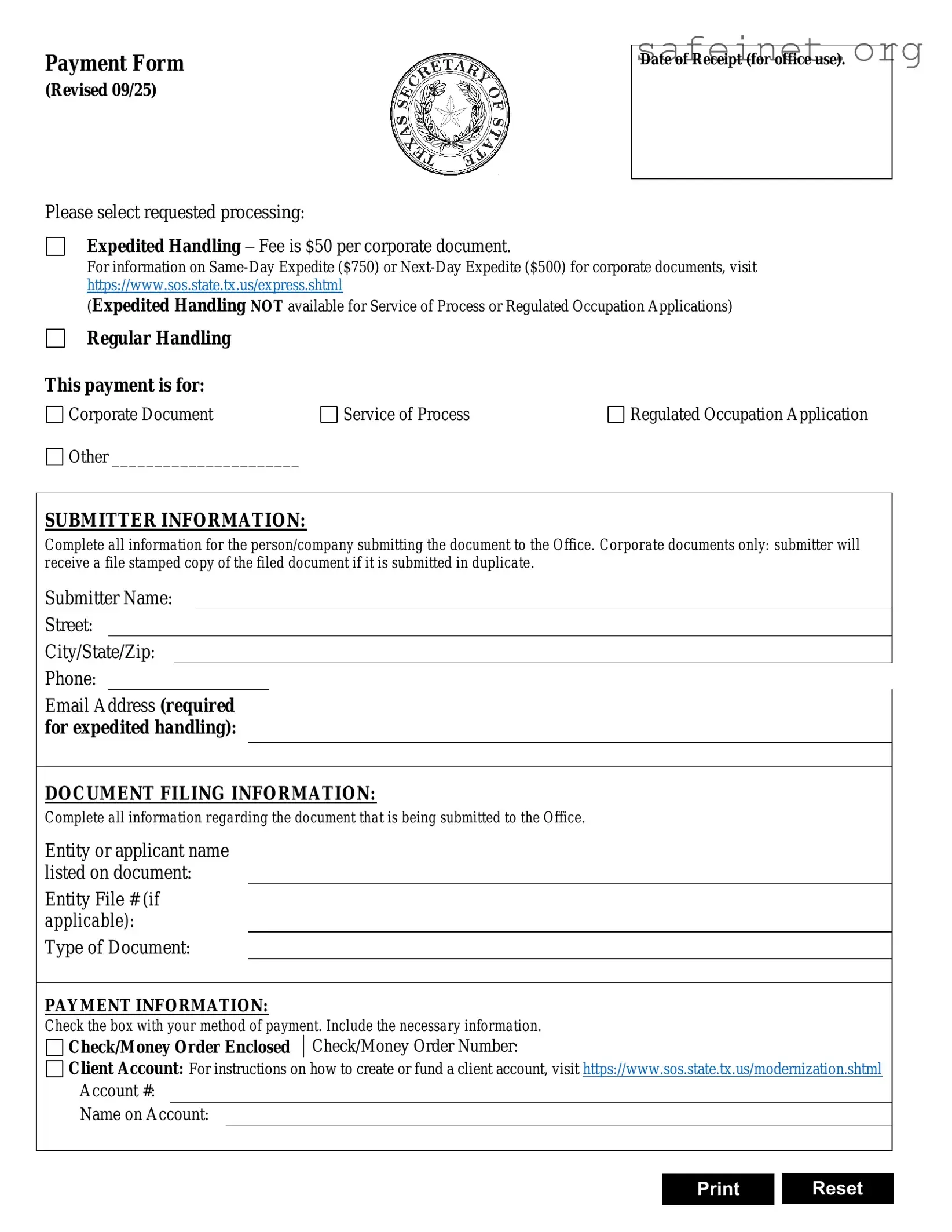
The Texas SOS Payment 807 form is an essential tool for individuals and businesses looking to submit various documents to the Secretary of State’s office in Texas. This form facilitates the payment process for filing corporate documents, obtaining copies, and managing UCC filings. It offers two main options for handling requests: expedited and regular processing, with specific fees attached to each service. For those who require faster processing, expedited handling is available, though it is important to note that this option is not applicable for authentication services or trademark applications. The form requires submitters to provide comprehensive information, including their name, contact details, and the specifics of the document being filed. Payment methods include major credit cards and checks, with additional instructions for entering card information to ensure a smooth transaction. Moreover, the form emphasizes the importance of including a return address for the documents, ensuring that submissions are efficiently processed and returned to the correct location. Understanding the nuances of the Texas SOS Payment 807 form can significantly streamline the filing process and help avoid potential delays.
Payment Form
(Revised 09/25)
Please select requested processing:
Expedited Handling – Fee is $50 per corporate document.
Date of Receipt (for office use).
For information on
(Expedited Handling NOT available for Service of Process or Regulated Occupation Applications)
Regular Handling
This payment is for:
Corporate Document |
Service of Process |
Regulated Occupation Application |
Other ______________________ |
|
|
SUBMITTER INFORMATION:
Complete all information for the person/company submitting the document to the Office. Corporate documents only: submitter will receive a file stamped copy of the filed document if it is submitted in duplicate.
Submitter Name:
Street:
City/State/Zip:
Phone:
Email Address (required for expedited handling):
DOCUMENT FILING INFORMATION:
Complete all information regarding the document that is being submitted to the Office.
Entity or applicant name listed on document:
Entity File # (if applicable):
Type of Document:
PAYMENT INFORMATION:
Check the box with your method of payment. Include the necessary information.
Check/Money Order Enclosed Check/Money Order Number:
Client Account: For instructions on how to create or fund a client account, visit https://www.sos.state.tx.us/modernization.shtml
Account #:
Name on Account:
Print Reset
| Fact Name | Details |
|---|---|
| Form Purpose | The Texas SOS Payment 807 form is used to submit payment for document filings with the Secretary of State. |
| Processing Options | Submitters can choose between expedited handling or regular handling for their documents. |
| Fees | Expedited handling costs $25 per corporate document, $10 for copies, and $15 for UCC filings. |
| Payment Methods | Accepted payment methods include credit cards (Visa, Mastercard, Discover, American Express) or check/money order. |
| Governing Law | This form is governed by Texas Business Organizations Code § 5.202 regarding filing fees. |
After gathering the necessary information, you are ready to fill out the Texas SOS Payment 807 form. Completing this form accurately is essential for processing your request efficiently. Follow the steps outlined below to ensure that all required fields are filled out correctly.
What is the Texas SOS Payment 807 form used for?
The Texas SOS Payment 807 form is utilized for submitting payments related to various document filings with the Texas Secretary of State. This form allows individuals or companies to request expedited or regular handling of their documents, ensuring that the necessary fees are paid for processing.
What types of documents can I file using this form?
You can file a variety of documents using the Texas SOS Payment 807 form, including corporate documents, copies of existing documents, and UCC filings. It is important to specify the type of document you are submitting to ensure proper processing.
How do I request expedited handling on the form?
To request expedited handling, you must mark the appropriate box on the form. Additionally, if you choose expedited service, you should provide an email address for communication regarding the status of your request. Note that expedited handling is not available for authentication services or trademark applications.
What payment methods are accepted on the Texas SOS Payment 807 form?
The form accepts several payment methods, including credit cards (Visa, Mastercard, Discover, and American Express) as well as checks or money orders. If paying by credit card, it is necessary to include the card number, expiration date, and security code. For checks or money orders, please ensure that they are enclosed with the form.
Is there a convenience fee for credit card payments?
Yes, payments made by credit card are subject to a convenience fee of 2.7% of the total fees incurred. This fee is statutorily authorized and will be added to the total amount charged to your card.
What information do I need to provide as a submitter?
As a submitter, you are required to provide your name, company or firm name (if applicable), street address, city, state, zip code, phone number, fax number, and email address. This information ensures that the Secretary of State can contact you if necessary and return any documents you submit.
What should I do if my return address is the same as my submitter information?
If your return address is the same as your submitter information, you can simply check the box provided on the form to indicate this. This will streamline the process and reduce the need for redundant information.
How can I ensure that my documents are returned to the correct address?
To ensure that your documents are returned to the correct address, you must include a return address on the form. If it differs from your submitter information, provide the complete address, including street, city, state, and zip code. This will help prevent any delays in receiving your documents.
Failing to select the appropriate processing option. Users often overlook the need to indicate whether they require expedited handling or regular handling.
Omitting necessary submitter information. It is crucial to completely fill out the submitter's name, address, and contact details. Incomplete information can lead to delays.
Incorrectly entering payment information. Individuals sometimes fail to provide the correct credit card details, including the card number, expiration date, and security code.
Not including a return address. Submitting the form without a return address can result in documents being undeliverable, causing significant processing issues.
Neglecting to specify the type of document being filed. Users frequently forget to indicate the type of document, which is essential for proper processing.
Ignoring the convenience fee. When paying by credit card, individuals may overlook the 2.7% convenience fee, which can lead to discrepancies in payment.
Not checking for accuracy before submission. Errors in any section of the form can lead to processing delays or rejections, so it is important to review all information carefully.
When submitting the Texas SOS Payment 807 form, you may also need to prepare additional documents to ensure a smooth filing process. These documents can help clarify your submission and provide necessary information to the Texas Secretary of State. Here’s a list of commonly used forms and documents that often accompany the Payment 807 form.
By preparing these documents alongside the Texas SOS Payment 807 form, you can streamline the filing process and ensure that your submission meets all necessary requirements. Each document serves a specific purpose and contributes to the overall compliance and success of your business in Texas.
The Texas SOS Payment 807 form shares similarities with the IRS Form 2848, Power of Attorney and Declaration of Representative. Both documents require detailed information about the individual or entity submitting the form. They both serve to authorize a representative to act on behalf of the submitter, allowing for streamlined communication with the respective government agency. Additionally, both forms include sections for payment information, ensuring that the necessary fees are processed efficiently.
Another comparable document is the U.S. Citizenship and Immigration Services (USCIS) Form G-28, Notice of Entry of Appearance as Attorney or Accredited Representative. Like the Texas SOS Payment 807 form, it requires the submitter to provide personal details and information about the document being filed. Both forms serve to designate a representative for official matters, facilitating communication and processing with the respective agencies. Payment details are also a crucial component in both forms, ensuring that fees are adequately managed.
The Texas SOS Payment 807 form is also similar to the California Secretary of State's Form LLC-12, Statement of Information. Both documents require the submission of specific information regarding the entity involved, including contact details and document type. Each form is designed to keep state records current and accurate. Additionally, both require payment information to process the filing, thus ensuring compliance with state regulations.
Additionally, the Texas SOS Payment 807 form can be likened to the Delaware Division of Corporations Annual Franchise Tax Report. This document, like the Texas form, requires detailed information about the entity, including the name and address of the submitter. Both forms aim to maintain updated records and ensure that any necessary fees are paid promptly. The payment sections are similarly structured, allowing for various methods of payment to be indicated.
The Texas SOS Payment 807 form is also comparable to the Florida Department of State's Annual Report form. Each document collects essential information about the entity and the submitter, ensuring that state records remain current. Both forms feature sections dedicated to payment, reflecting the requirement to pay fees associated with the filings. This alignment in structure aids in the efficient processing of documents by the respective state agencies.
Another document that bears resemblance is the New York State Department of State's Certificate of Amendment form. This form, like the Texas SOS Payment 807, requires the submitter to provide specific details about the entity and the nature of the filing. Both documents include payment information to facilitate the processing of fees, ensuring that the necessary charges are covered for the services rendered by the state.
The Texas SOS Payment 807 form also shares characteristics with the Illinois Secretary of State's Application for Admission to Transact Business. Both documents require detailed information about the entity and the submitter. They serve to formalize the filing process with the state, ensuring that all necessary fees are collected. The payment sections in each form are structured similarly, allowing for clear instructions on how to submit payment.
Lastly, the Texas SOS Payment 807 form is akin to the Michigan Department of Licensing and Regulatory Affairs (LARA) Business Entity Information form. Both documents necessitate comprehensive details about the entity and the individual submitting the form. They are designed to keep state records accurate and up-to-date. Each form also includes payment information, ensuring that all applicable fees are processed correctly and efficiently.
When filling out the Texas SOS Payment 807 form, it is important to follow specific guidelines to ensure your submission is processed smoothly. Here are nine things to do and not to do:
Understanding the Texas SOS Payment 807 form is crucial for anyone looking to submit documents efficiently. However, several misconceptions can lead to confusion. Here’s a list of common misunderstandings:
Being aware of these misconceptions can help streamline the process and ensure that submissions are handled efficiently. Always read the instructions carefully and provide all necessary information to avoid delays.
When filling out the Texas SOS Payment 807 form, keep these key takeaways in mind:
Following these guidelines can help ensure a smooth submission process.