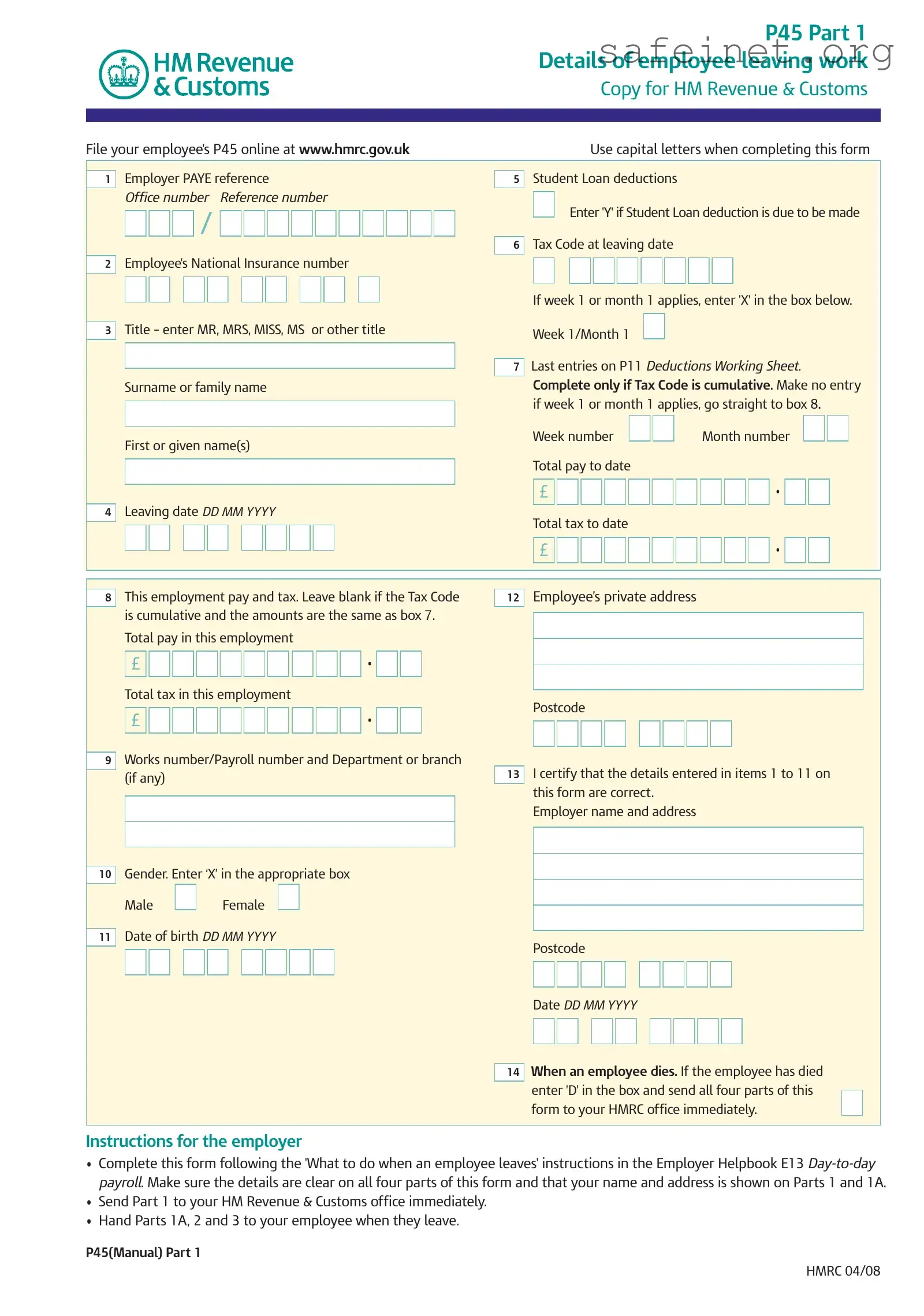
The P45 form is an essential document for employees transitioning between jobs in the UK. It serves as a record of an employee's earnings and tax deductions during their previous employment. This form is divided into several parts, each with specific instructions for both employers and employees. Part 1 is submitted to HM Revenue & Customs (HMRC) by the employer, while Parts 1A, 2, and 3 are given to the employee and their new employer. Key details included in the P45 form are the employee's National Insurance number, tax code at the time of leaving, total pay to date, and total tax deducted. Employers must ensure that the form is filled out accurately, as this information is crucial for the employee's tax situation moving forward. The P45 also plays a significant role in determining any student loan deductions that may apply. It is imperative for employees to keep their copy of the P45 safe, as it may be required for future tax returns or when claiming benefits. Understanding the components and purpose of the P45 form can help facilitate a smoother transition into new employment.

|
|
|
|
|
|
|
|
|
|
|
|
|
|
|
|
|
|
|
|
|
|
|
|
|
|
|
|
|
|
|
|
|
|
|
|
|
|
|
|
|
|
|
|
P45 Part 1 |
|||||||||
|
|
|
|
|
|
|
|
|
|
|
|
|
|
|
|
|
|
|
|
|
|
|
|
|
|
|
|
Details of employee leaving work |
|||||||||||||||||||||||||
|
|
|
|
|
|
|
|
|
|
|
|
|
|
|
|
|
|
|
|
|
|
|
|
|
|
|
|
|
|
|
|
Copy for HM Revenue & Customs |
|||||||||||||||||||||
|
|
|
|
|
|
|
|
|
|
|
|
|
|
|
|
|
|
|
|
|
|
|
|
|
|
|
|
|
|
|
|
|
|
|
|
|
|
|
|
|
|
|
|
|
|
|
|
|
|
|
|
|
|
|
|
|
|
|
|
|
|
|
|
|
|
|
|
|
|
|
|
|
|
|
|
|
|
|
|
|
|
|
|
|
|
|
|
|
|
|
|
|
|
|
|
|
|
|
|
|
|
|
|
|
|
|
|
|
File your employee's P45 online at www.hmrc.gov.uk |
|
|
|
|
|
|
Use capital letters when completing this form |
|||||||||||||||||||||||||||||||||||||||||||||
|
|
|
|
|
|
|
|
|
|
|
|
|
|
|
|
|
|
|
|
|
|
|
|
|
|
|
|
|
|
|
|
|
|
|
|
|
|
|
|
|
|
|
|
|
|
|
|
|
|
|
|
|
|
|
|
|
Employer PAYE reference |
|
|
|
|
|
|
|
|
|
|
|
|
Student Loan deductions |
|
|
|
|
|
|
|
|
|
|
|
|
|
|
|
||||||||||||||||||||||
|
1 |
|
|
|
|
|
|
|
|
|
|
|
5 |
|
|
|
|
|
|
|
|
|
|
|
|
|
|
|
|
||||||||||||||||||||||||
|
|
|
Office number |
Reference number |
|
|
|
|
Enter 'Y' if Student Loan deduction is due to be made |
|
|||||||||||||||||||||||||||||||||||||||||||
|
|
|
|
|
|
|
/ |
|
|
|
|
|
|
|
|
|
|
|
|
|
|
|
|
|
|
|
|
|
|
||||||||||||||||||||||||
|
|
|
|
|
|
|
|
|
|
|
|
|
|
|
|
|
|
|
|
|
|
|
|
|
|
Tax Code at leaving date |
|
|
|
|
|
|
|
|
|
|
|
|
|
|
|
||||||||||||
|
|
|
|
|
|
|
|
|
|
|
|
|
|
|
|
|
|
|
|
|
|
|
|
|
|
6 |
|
|
|
|
|
|
|
|
|
|
|
|
|
|
|
|
|||||||||||
|
2 |
|
Employee's National Insurance number |
|
|
|
|
|
|
|
|
|
|
|
|
|
|
|
|
|
|
|
|
|
|
|
|
|
|
|
|
||||||||||||||||||||||
|
|
|
|
|
|
|
|
|
|
|
|
|
|
|
|
|
|
|
|
|
|
|
|
|
|
|
|
|
|
|
|
|
|
|
|
|
|
|
|
|
|
|
|
|
|||||||||
|
|
|
|
|
|
|
|
|
|
|
|
|
|
|
|
|
|
|
|
|
|
|
|
|
|
|
|
If week 1 or month 1 applies, enter 'X' in the box below. |
|
||||||||||||||||||||||||
|
|
|
Title – enter MR, MRS, MISS, MS |
or other title |
|
|
|||||||||||||||||||||||||||||||||||||||||||||||
|
|
|
|
|
|
|
|
|
|
|
|
|
|
|
|
|
|
|
|
|
|
|
|
|
|
|
|
|
|
|
|||||||||||||||||||||||
|
3 |
|
|
|
Week 1/Month 1 |
|
|
|
|
|
|
|
|
|
|
|
|
|
|
|
|
|
|
||||||||||||||||||||||||||||||
|
|
|
|
|
|
|
|
|
|
|
|
|
|
|
|
|
|
|
|
|
|
|
|
|
|
|
Last entries on P11 Deductions Working Sheet. |
|
|||||||||||||||||||||||||
|
|
|
|
|
|
|
|
|
|
|
|
|
|
|
|
|
|
|
|
|
|
|
|
|
|
7 |
|
||||||||||||||||||||||||||
|
|
|
Surname or family name |
|
|
|
|
|
|
|
|
|
|
|
|
Complete only if Tax Code is cumulative. Make no entry |
|
||||||||||||||||||||||||||||||||||||
|
|
|
|
|
|
|
|
|
|
|
|
|
|
|
|
||||||||||||||||||||||||||||||||||||||
|
|
|
|
|
|
|
|
|
|
|
|
|
|
|
|
|
|
|
|
|
|
|
|
|
|
|
|
if week 1 or month 1 applies, go straight to box 8. |
|
||||||||||||||||||||||||
|
|
|
|
|
|
|
|
|
|
|
|
|
|
|
|
|
|
|
|
|
|
|
|
|
|
|
|
Week number |
|
|
|
Month number |
|
|
|
|
|
|
|
||||||||||||||
|
|
|
First or given name(s) |
|
|
|
|
|
|
|
|
|
|
|
|
|
|
|
|
|
|
|
|
||||||||||||||||||||||||||||||
|
|
|
|
|
|
|
|
|
|
|
|
|
|
|
Total pay to date |
|
|
|
|
|
|
|
|
|
|
|
|
|
|
|
|||||||||||||||||||||||
|
|
|
|
|
|
|
|
|
|
|
|
|
|
|
|
|
|
|
|
|
|
|
|
|
|
|
|
|
|
|
|
|
|
|
|
|
|
|
|
|
|
|
|||||||||||
|
|
|
|
|
|
|
|
|
|
|
|
|
|
|
|
|
|
|
|
|
|
|
|
|
|
|
|
£ |
|
|
|
|
|
|
|
|
|
|
|
|
|
|
|
|
• |
|
|
|
|
|
|
|
|
|
|
|
|
|
|
|
|
|
|
|
|
|
|
|
|
|
|
|
|
|
|
|
|
|
|
|
|
|
|
|
|
|
|
|
|
|
|
|
|
|
|
|
|
|
|
|
|
|
|
|
|||
|
4 |
|
Leaving date DD MM YYYY |
|
|
|
|
|
|
|
|
|
|
|
|
Total tax to date |
|
|
|
|
|
|
|
|
|
|
|
|
|
|
|
||||||||||||||||||||||
|
|
|
|
|
|
|
|
|
|
|
|
|
|
|
|
|
|
|
|
|
|
|
|
|
|
|
|
|
|
|
|
|
|
|
|
|
|
|
|
|
|
|
|||||||||||
|
|
|
|
|
|
|
|
|
|
|
|
|
|
|
|
|
|
|
|
|
|
|
|
|
|
|
|
£ |
|
|
|
|
|
|
|
|
|
|
|
|
|
|
|
|
• |
|
|
|
|
|
|
|
|
|
|
|
|
|
|
|
|
|
|
|
|
|
|
|
|
|
|
|
|
|
|
|
|
|
|
|
|
||||||||||||||||||||||||||
|
|
|
|
|
|
|
|
|
|
|
|
|
|
|
|
|
|
|
|
|
|
|
|
|
|
|
|
|
|
|
|
|
|
|
|
|
|
|
|
|
|
|
|
|
|
|
|
|
|
|
|
|
|
|
|
|
|
|
|
|
|
|
|
|
|
|
|
|
|
|
|
|
|
|
|
|
|
|
|
|
|
|
|
|
|
|
|
|
|
|
|
|
|
|
|
|
|
|
|
|
|
|
|
|
|
|
|
|
|
|
|
|
|
Employee’s private address |
|
|
|
|
|
|
|
|
|
|
|
|
|
|
|
||||||||||||||||||||||||||||||||
|
8 |
|
This employment pay and tax. Leave blank if the Tax Code |
12 |
|
|
|
|
|
|
|
|
|
|
|
|
|
|
|
|
|||||||||||||||||||||||||||||||||
|
|
|
is cumulative and the amounts are the same as box 7. |
|
|
|
|
|
|
|
|
|
|
|
|
|
|
|
|
|
|
|
|
|
|
|
|
|
|
|
|
||||||||||||||||||||||
|
|
|
|
|
|
|
|
|
|
|
|
|
|
|
|
|
|
|
|
|
|
|
|
|
|
|
|
|
|
|
|||||||||||||||||||||||
|
|
|
Total pay in this employment |
|
|
|
|
|
|
|
|
|
|
|
|
|
|
|
|
|
|
|
|
|
|
|
|
|
|
|
|
|
|
|
|
|
|
|
|
|
|
||||||||||||
|
|
|
|
|
|
|
|
|
|
|
|
|
|
|
|
|
|
|
|
|
|
|
|
|
|
|
|
|
|
|
|
|
|
|
|
|
|
|
|
|
|||||||||||||
|
|
|
£ |
|
|
|
|
|
|
|
|
|
|
|
|
|
|
|
• |
|
|
|
|
|
|
|
|
|
|
|
|
|
|
|
|
|
|
|
|
|
|
|
|
|
|
|
|
|
|
|
|||
|
|
|
|
|
|
|
|
|
|
|
|
|
|
|
|
|
|
|
|
|
|
|
|
|
|
|
|
|
|
|
|
|
|
|
|
|
|
|
|
|
|
|
|
|
|
|
|
|
|
|
|
||
|
|
|
Total tax in this employment |
|
|
|
|
|
|
|
|
|
|
|
|
|
|
|
|
|
|
|
|
|
|
|
|
|
|
|
|
|
|
|
|
|
|
|
|
|
|
||||||||||||
|
|
|
|
|
|
|
|
|
|
|
|
|
|
|
Postcode |
|
|
|
|
|
|
|
|
|
|
|
|
|
|
|
|||||||||||||||||||||||
|
|
|
£ |
|
|
|
|
|
|
|
|
|
|
|
|
|
|
|
• |
|
|
|
|
|
|
|
|
|
|
|
|
|
|
|
|
|
|
|
|
|
|
|
|||||||||||
|
|
|
|
|
|
|
|
|
|
|
|
|
|
|
|
|
|
|
|
|
|
|
|
|
|
|
|
|
|
|
|
|
|
|
|
|
|
|
|
|
|
|
|
|
|
|
|
|
|
|
|
||
|
|
|
|
|
|
|
|
|
|
|
|
|
|
|
|
|
|
|
|
|
|
|
|
|
|
|
|
|
|
|
|
|
|
|
|
|
|
|
|
|
|
|
|
|
|
|
|
|
|
|
|
|
|
|
|
|
Works number/Payroll number and Department or branch |
|
|
|
|
|
|
|
|
|
|
|
|
|
|
|
|
|
|
|
|
|
|
|
|
|
|
|
|
||||||||||||||||||||||
|
|
|
|
|
|
|
|
|
|
|
|
|
|
|
|
|
|
|
|
|
|
|
|
|
|
|
|
|
|
|
|||||||||||||||||||||||
|
9 |
|
|
|
|
|
|
|
|
|
|
|
|
|
|
|
|
|
|
|
|
|
|
|
|
|
|
|
|
|
|||||||||||||||||||||||
|
|
|
(if any) |
|
|
|
|
|
|
|
|
|
|
|
|
|
|
|
|
|
13 |
|
I certify that the details entered in items 1 to 11 on |
||||||||||||||||||||||||||||||
|
|
|
|
|
|
|
|
|
|
|
|
|
|
|
|
|
|
|
|
|
|
|
|
|
|
|
|
this form are correct. |
|
|
|
|
|
|
|
|
|
|
|
|
|
|
|
||||||||||
|
|
|
|
|
|
|
|
|
|
|
|
|
|
|
|
|
|
|
|
|
|
|
|
|
|
|
|
Employer name and address |
|
|
|
|
|
|
|
|
|
|
|
|
|
|
|
||||||||||
|
|
|
|
|
|
|
|
|
|
|
|
|
|
|
|
|
|
|
|
|
|
|
|
|
|
|
|
|
|
|
|
|
|
|
|
|
|
|
|
|
|
||||||||||||
|
|
|
|
|
|
|
|
|
|
|
|
|
|
|
|
|
|
|
|
|
|
|
|
|
|
|
|
|
|
|
|
|
|
|
|
|
|
|
|
|
|
|
|
|
|
|
|
|
|
|
|
|
|
|
|
|
Gender. Enter ‘X’ in the appropriate box |
|
|
|
|
|
|
|
|
|
|
|
|
|
|
|
|
|
|
|
|
|
|
|
|
|
|
|
|
||||||||||||||||||||||
|
|
|
|
|
|
|
|
|
|
|
|
|
|
|
|
|
|
|
|
|
|
|
|
|
|
|
|
|
|
|
|||||||||||||||||||||||
|
10 |
|
|
|
|
|
|
|
|
|
|
|
|
|
|
|
|
|
|
|
|
|
|
|
|
|
|
|
|
|
|||||||||||||||||||||||
|
|
|
Male |
|
|
Female |
|
|
|
|
|
|
|
|
|
|
|
|
|
|
|
|
|
|
|
|
|
|
|
|
|
|
|
|
|
|
|
|
|
|
|
|
|
|
|
|
|
||||||
|
|
|
|
|
|
|
|
|
|
|
|
|
|
|
|
|
|
|
|
|
|
|
|
|
|
|
|
|
|
|
|
|
|
|
|
|
|
|
|
|
|
|
|
|
|
|
|||||||
|
|
|
Date of birth DD MM YYYY |
|
|
|
|
|
|
|
|
|
|
|
|
|
|
|
|
|
|
|
|
|
|
|
|
|
|
|
|
|
|
|
|
|
|
|
|
|
|
||||||||||||
|
11 |
|
|
|
|
|
|
|
|
|
|
|
|
|
Postcode |
|
|
|
|
|
|
|
|
|
|
|
|
|
|
|
|||||||||||||||||||||||
|
|
|
|
|
|
|
|
|
|
|
|
|
|
|
|
|
|
|
|
|
|
|
|
|
|
|
|
|
|
|
|
|
|
|
|
|
|
|
|
|
|
|
|||||||||||
|
|
|
|
|
|
|
|
|
|
|
|
|
|
|
|
|
|
|
|
|
|
|
|
|
|
|
|
|
|
|
|
|
|
|
|
|
|
|
|
|
|
|
|
|
|
|
|
|
|
|
|
|
|
|
|
|
|
|
|
|
|
|
|
|
|
|
|
|
|
|
|
|
|
|
|
|
|
|
|
|
|
|
|
|
|
|
|
|
|
|
|
|
|
|
|
|
|
|
|
|
|
|
|
||||
|
|
|
|
|
|
|
|
|
|
|
|
|
|
|
|
|
|
|
|
|
|
|
|
|
|
|
|
Date DD MM YYYY |
|
|
|
|
|
|
|
|
|
|
|
|
|
|
|
||||||||||
|
|
|
|
|
|
|
|
|
|
|
|
|
|
|
|
|
|
|
|
|
|
|
|
|
|
|
|
|
|
|
|
|
|
|
|
|
|
|
|
|
|
|
|
|
|
|
|
|
|
|
|
|
|
|
|
|
|
|
|
|
|
|
|
|
|
|
|
|
|
|
|
|
|
|
|
|
|
|
|
|
When an employee dies. If the employee has died |
||||||||||||||||||||||||||
|
|
|
|
|
|
|
|
|
|
|
|
|
|
|
|
|
|
|
|
|
|
|
|
|
|
14 |
|||||||||||||||||||||||||||
|
|
|
|
|
|
|
|
|
|
|
|
|
|
|
|
|
|
|
|
|
|
|
|
|
|
|
enter 'D' in the box and send all four parts of this |
|
|
|
|
||||||||||||||||||||||
|
|
|
|
|
|
|
|
|
|
|
|
|
|
|
|
|
|
|
|
|
|
|
|
|
|
|
|
|
|
|
|||||||||||||||||||||||
|
|
|
|
|
|
|
|
|
|
|
|
|
|
|
|
|
|
|
|
|
|
|
|
|
|
|
form to your HMRC office immediately. |
|
|
|
|||||||||||||||||||||||
|
|
|
|
|
|
|
|
|
|
|
|
|
|
|
|
|
|
|
|
|
|
|
|
|
|
|
|
|
|
|
|
|
|
|
|
|
|
|
|
|
|
|
|
|
|
|
|
|
|
|
|
|
|
Instructions for the employer
•Complete this form following the 'What to do when an employee leaves' instructions in the Employer Helpbook E13
•Send Part 1 to your HM Revenue & Customs office immediately.
•Hand Parts 1A, 2 and 3 to your employee when they leave.
P45(Manual) Part 1
HMRC 04/08
| Fact Name | Description |
|---|---|
| Purpose | The P45 form is used when an employee leaves a job to provide details of their pay and tax deductions. |
| Parts | The P45 consists of three parts: Part 1 for HM Revenue & Customs, Part 1A for the employee, and Parts 2 and 3 for the new employer. |
| Completion | Employers must complete the form using capital letters and ensure all details are clear and accurate. |
| Submission | Part 1 should be sent to HM Revenue & Customs immediately after an employee leaves. |
| Employee's Responsibility | Employees should keep Part 1A safe, as it may be needed for future tax returns. |
| Student Loans | The form includes sections to indicate if Student Loan deductions are applicable. |
| Tax Code | Employers must enter the employee's tax code at the time of leaving, which affects tax calculations. |
| Week/Month 1 Indicator | If the employee's tax is calculated on a week 1 or month 1 basis, this must be marked on the form. |
| HMRC Resources | Employers and employees can find more information and guidance on the HMRC website. |
| State-Specific Regulations | While the P45 is a UK form, employers in different states should check local laws regarding employee termination and tax reporting. |
Filling out the P45 IT form is a straightforward process that requires attention to detail. This form is essential for both employers and employees during the transition between jobs. After completing the form, ensure that all parts are distributed correctly and filed as required.
Once the form is completed and submitted, the employee should keep their copy safe. This will be important for any future tax matters, including potential refunds or tax returns. The employer must ensure that all parts of the form are handled according to the guidelines to avoid any complications.
What is a P45 form?
The P45 form is a document issued by an employer when an employee leaves their job. It outlines the employee's tax details, including their total earnings and the tax paid during their employment. This form is important for both the employee and the new employer, as it helps ensure the correct amount of tax is deducted in future employment.
What parts does the P45 consist of?
The P45 is divided into three parts: Part 1, Part 1A, and Part 2. Part 1 is sent to HM Revenue & Customs (HMRC) by the employer. Part 1A is given to the employee, and Parts 2 and 3 are provided to the new employer. Each part contains similar information but serves different purposes in the employment transition process.
How do I fill out the P45 form?
When completing the P45, employers should ensure all details are clear and accurate. This includes the employee's name, National Insurance number, leaving date, and tax information. It's essential to use capital letters and follow the instructions provided in the Employer Helpbook E13. If the employee has a student loan, the appropriate deductions must also be noted.
What should an employee do with their P45?
Employees should keep their P45 safe, especially Part 1A, as it may be needed for tax returns or when starting a new job. It is crucial to provide Parts 2 and 3 to the new employer to avoid emergency tax codes that could lead to overpayment of taxes.
What happens if an employee dies?
If an employee passes away, the employer must enter 'D' on the P45 form and send all parts to HMRC immediately. This ensures that the tax affairs of the deceased are handled appropriately.
Can I claim a tax refund using the P45?
Yes, if you have overpaid taxes, you can use the P45 to claim a refund. If you stop working and have paid tax, you can request form P50 from HMRC to initiate the refund process. It’s important to keep the P45 handy for this purpose.
What if I don’t want my new employer to see my P45 details?
If you prefer your new employer not to see the details on your P45, you can send it directly to HMRC with a letter stating your wishes. However, be aware that this may result in higher taxes initially, as your new employer may use an emergency tax code until HMRC updates their records.
How does the P45 affect my student loan repayments?
The P45 includes information about student loan deductions. If you are required to make these deductions, it will be noted on the form. If you move to a new job, your new employer will need this information to continue the correct deductions.
Where can I get help regarding my P45?
If you need assistance with your P45 or have questions about your tax situation, you can contact any HMRC office or visit their website. They provide resources and guidance to help you understand your obligations and rights regarding tax and employment changes.
Using Incorrect Capitalization: It's essential to use capital letters when filling out the P45 form. Many people forget this simple rule, leading to potential confusion.
Omitting National Insurance Number: Failing to include the employee's National Insurance number can delay processing. This number is crucial for tax records and benefits.
Misunderstanding Week 1/Month 1 Codes: Some individuals mistakenly enter 'X' in the box for week 1 or month 1 when it doesn't apply. This can lead to incorrect tax deductions.
Incorrectly Filling Out Tax Code: The tax code at the leaving date must be accurate. Errors here can result in an employee being taxed incorrectly, either too much or too little.
Leaving Sections Blank: Certain sections, such as total pay and total tax to date, should not be left blank if applicable. Omitting this information can complicate tax calculations.
Failing to Certify the Information: Not signing or certifying that the details are correct can invalidate the form. This step is crucial for both the employer and employee.
Ignoring the Leaving Date: The leaving date is a critical piece of information. Forgetting to fill it out can lead to administrative issues and delays in processing.
Not Keeping a Copy: Employees should keep a copy of the P45 for their records. Failing to do so can make it difficult to address any future tax issues.
The P45 form is a crucial document for employees leaving a job, as it provides important information about their pay and tax details. Alongside the P45, there are several other forms and documents that may be necessary for both employees and employers. Here’s a brief overview of these documents:
These documents play a significant role in ensuring that both employees and employers manage tax obligations and benefits correctly. Understanding their purpose can help facilitate a smoother transition when leaving a job.
The P60 form serves a similar purpose to the P45, as both documents provide essential information regarding an employee's earnings and tax contributions. The P60 is issued at the end of the tax year, summarizing an employee's total pay and tax deductions for that year. In contrast, the P45 is provided when an employee leaves a job, detailing their pay and tax up until their departure. Both forms are crucial for tax purposes, allowing individuals to keep track of their financial records and ensure accurate tax filings.
The P11D form also parallels the P45, as it is used to report benefits and expenses provided to employees. While the P45 focuses on salary and tax deductions upon leaving a job, the P11D captures additional non-cash benefits that may affect an employee’s tax liability. This document helps HM Revenue & Customs assess the total taxable income, ensuring that all aspects of compensation are considered during tax assessments.
The P60U is another document that shares similarities with the P45. This form is issued to employees who have not received a P60, typically because they left a job before the end of the tax year. Like the P45, the P60U provides a summary of earnings and tax deductions, allowing employees to claim tax refunds or fulfill tax obligations. Both documents serve to clarify an individual's tax situation, albeit at different points in their employment journey.
The payslip is a more routine document but is similar to the P45 in that it provides a breakdown of an employee’s earnings and deductions for each pay period. While the P45 is a one-time document issued upon leaving a job, payslips are generated regularly and help employees track their financial progress. Both documents are vital for understanding how much tax has been paid and what remains owed.
The tax return form is another document that aligns with the P45. After receiving a P45, individuals may need to complete a tax return to report their total income for the year, including earnings from previous employments. The information on the P45 helps ensure that all income is accurately reported, preventing discrepancies that could lead to underpayment or overpayment of taxes. Both documents play a role in the broader context of personal tax management.
Lastly, the P50 form, used for claiming tax refunds when an individual stops working, is similar to the P45. The P50 allows employees to request a refund for any overpaid taxes, particularly relevant when they have received a P45 indicating their earnings and tax deductions. Both forms facilitate the process of reconciling tax obligations, making it easier for individuals to manage their financial responsibilities after leaving employment.
When filling out the P45 IT form, there are several important guidelines to keep in mind. Below is a list of five things you should do and five things you should avoid to ensure the process goes smoothly.
Understanding the P45 form can be challenging, and several misconceptions often arise. Below is a list of common misunderstandings about the P45 form, along with clarifications for each.
Addressing these misconceptions can help ensure that both employees and employers understand the importance of the P45 form and its proper handling.
The P45 form is used when an employee leaves a job. It provides important information about their pay and tax details.
This form consists of three parts: Part 1 for HM Revenue & Customs (HMRC), Part 1A for the employee, and Parts 2 and 3 for the new employer.
When filling out the P45, use capital letters and ensure all details are clear and accurate.
Important fields include the employee’s National Insurance number, leaving date, and total pay and tax to date.
If the employee has a Student Loan, indicate this by entering 'Y' in the appropriate box.
For employees leaving under specific circumstances, such as death, special instructions apply. This includes marking the form accordingly.
Employees should keep Part 1A safe, as it may be needed for tax returns or future employment.
New employers must complete Parts 2 and 3 of the P45 and send them to HMRC promptly.
If an employee does not want their new employer to see their previous employment details, they can send the form directly to HMRC with a request for confidentiality.