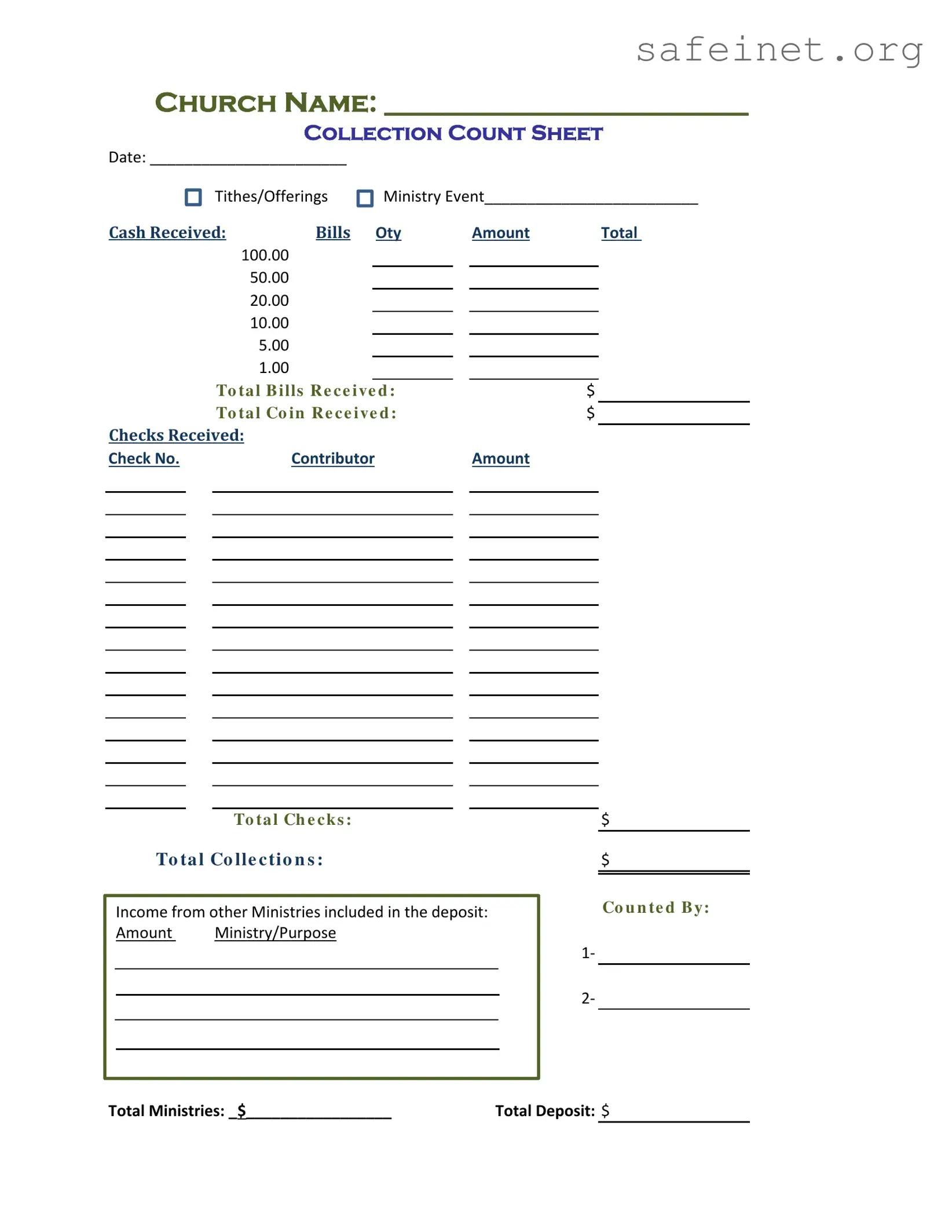
When managing the financial aspects of a church, clarity and organization are paramount. The Offer Report form serves as a vital tool for recording and tracking the various contributions made by congregants during services and events. This form captures essential details such as the church name, the date of the collection, and the specific ministry event associated with the tithes and offerings. It provides a comprehensive breakdown of cash received, including different denominations of bills and coins, ensuring transparency in financial reporting. Additionally, the form allows for the documentation of checks received, including the check number and contributor information, which aids in maintaining accurate records. It also includes sections to note any income from other ministries, further enhancing the overall financial picture. With designated spaces for the person counting the contributions and totals for each category, this form streamlines the process of financial accountability, making it an indispensable resource for church administrators.

CHURCH NAME: __________________________
COLLECTION COUNT SHEET
Date: _______________________ |
|
|
|
|
|
|
||||
|
|
Tithes/Offerings |
Ministry Event_________________________ |
|||||||
CASH RECEIVED: |
BILLS |
Oty |
|
Amount |
|
|
Total |
|||
100.00 |
|
|
|
|
|
|
|
|
||
50.00 |
|
|
|
|
|
|
|
|
||
|
|
|
|
|
|
|
|
|||
20.00 |
|
|
|
|
|
|
|
|
||
|
|
|
|
|
|
|
|
|||
10.00 |
|
|
|
|
|
|
|
|
||
5.00 |
|
|
|
|
|
|
|
|
||
|
|
|
|
|
|
|
|
|||
1.00 |
|
|
|
|
|
|
|
|
||
|
|
|
|
|
|
|
|
|||
|
|
To ta l B i lls R e c e i ve d : |
|
|
$ |
|
|
|||
|
|
To ta l Co i n R e c e i ve d : |
|
|
$ |
|
|
|||
CHECKS RECEIVED: |
|
|
|
|
|
|
|
|
||
Check No. |
Contributor |
|
|
Amount |
|
|
|
|||
|
|
|
|
|
|
|
|
|
|
|
|
|
|
|
|
|
|
|
|
|
|
|
|
|
|
|
|
|
|
|
|
|
|
|
|
|
|
|
|
|
|
|
|
|
|
|
|
|
|
|
|
|
|
|
|
|
|
|
|
|
|
|
|
|
|
|
|
|
|
|
|
|
|
|
|
|
|
|
|
|
|
|
|
|
|
|
|
|
|
|
|
|
|
|
|
|
|
|
|
|
|
|
|
|
|
|
|
|
|
|
|
|
|
|
|
|
|
|
|
|
|
|
|
|
|
|
|
|
|
|
|
|
|
|
|
|
|
|
|
|
|
|
|
|
|
|
|
|
|
|
|
|
|
|
|
|
|
|
|
|
|
|
|
|
To ta l Ch e c k s :
To ta l Co lle c ti o n s :
Income from other Ministries included in the deposit:
Amount Ministry/Purpose
$
$
Co u n te d B y:
1‐
2‐
Total Ministries: _$_________________ |
Total Deposit: $ |
|
|
|
|
| Fact Name | Description |
|---|---|
| Purpose | The Offer Report form is used to document and track the collection of tithes and offerings during church events. |
| Collection Count Sheet | This section includes a detailed breakdown of cash and checks received, ensuring transparency in financial reporting. |
| Cash Breakdown | It lists different denominations of cash received, including bills and coins, to provide a clear total for each category. |
| Checks Received | The form captures information about checks, including check numbers and contributors, which aids in tracking donations. |
| Total Collections | At the end of the form, totals for cash, checks, and overall collections are calculated to give a complete financial picture. |
| Income from Other Ministries | This section allows for the inclusion of additional income from other ministries, ensuring all funds are accounted for. |
| Counted By | Names of individuals who counted the collections are recorded, adding accountability to the process. |
| Governing Law | The use of the Offer Report form is governed by state laws regarding charitable donations and financial reporting, which may vary by state. |
Once you have gathered all necessary information, you can begin filling out the Offer Report form. This form is crucial for accurately documenting the financial contributions received by your church. Follow these steps to ensure that you complete the form correctly.
What is the purpose of the Offer Report form?
The Offer Report form is designed to help churches track and record the collections received during services or events. It provides a clear and organized way to document cash, checks, and contributions from various ministries, ensuring accurate financial reporting.
What information do I need to fill out on the form?
You will need to provide the church name, the date of the collection, and details about the tithes and offerings. This includes the amounts received in cash (broken down by bill denominations), checks (with check numbers and contributor names), and any income from other ministries.
How should I handle cash received?
When recording cash, list the number of each type of bill received. For example, if you have ten $100 bills, write "10" next to the $100 line and "1000" in the total column. This helps ensure that the total cash amount is accurate.
What if I receive checks from multiple contributors?
For each check received, write down the check number, the contributor’s name, and the amount of the check. Sum all the checks to get the total checks amount, which should be recorded on the form.
How do I report income from other ministries?
If you receive contributions from other ministries, list the amount and the purpose of each contribution. This ensures transparency and helps track the overall financial health of the church.
Who is responsible for counting the collections?
The form includes a section for the names of individuals who counted the collections. It is important to have at least two people involved in this process for accuracy and accountability.
How do I calculate the total collections?
Add the total cash received and the total checks received to find the total collections. This total should be clearly recorded on the form to reflect the overall income for that particular service or event.
What should I do with the completed Offer Report form?
Once the form is filled out, it should be submitted to the church's financial office or treasurer. Keeping a copy for your records is also advisable to maintain a clear financial history.
Can I modify the Offer Report form for specific events?
Yes, you can adjust the form to better suit the needs of specific events. Adding sections or modifying existing ones can help capture all necessary information, as long as the key data points are still included.
Is there a deadline for submitting the Offer Report form?
While specific deadlines may vary by church, it is generally best to submit the form as soon as possible after the collection event. This ensures timely financial reporting and helps maintain accurate records.
Leaving the church name blank. This is crucial for identifying the report's origin.
Failing to include the date. A date provides context and helps with record-keeping.
Not specifying the ministry event. This detail helps clarify the purpose of the collection.
Incorrectly calculating the total cash received. Always double-check your math to ensure accuracy.
Neglecting to list check numbers for each contribution. This can lead to confusion during audits.
Omitting the total collections amount. This figure is essential for financial transparency.
Forgetting to include income from other ministries. This can skew the overall financial picture.
Not signing off on the counted by section. This adds accountability to the report.
The Offer Report form is an essential document used by churches to track and report the collection of tithes and offerings. However, several other forms and documents often accompany it to ensure accurate record-keeping and compliance with financial regulations. Below is a list of commonly used forms that support the Offer Report process.
Utilizing these documents in conjunction with the Offer Report form helps maintain transparency and accuracy in financial reporting. Together, they contribute to the overall financial integrity of the church, ensuring that funds are managed responsibly and in accordance with best practices.
The Offer Report form shares similarities with a Cash Receipt form, which is commonly used to document cash transactions. Both documents serve the purpose of recording the amount of cash received, detailing the denominations of bills and coins. While the Offer Report focuses on tithes and offerings within a church context, the Cash Receipt form can be utilized in various settings, such as retail or service industries, to provide a clear record of cash transactions for accountability and financial tracking.
Another document akin to the Offer Report is the Donation Receipt. This form is specifically designed to acknowledge contributions made to nonprofit organizations, including churches. Like the Offer Report, it captures donor information, the amount donated, and the date of the contribution. However, the Donation Receipt often includes a statement regarding the tax-deductible nature of the donation, providing additional information for the donor's tax records.
The Financial Contribution Report is also similar to the Offer Report, as it summarizes all contributions received over a specific period. This report can be used by organizations to analyze trends in giving and is often shared with stakeholders. While the Offer Report focuses on a single collection event, the Financial Contribution Report aggregates data to provide a broader view of financial health and donor engagement.
Another related document is the Pledge Tracking Sheet. This sheet is used to monitor commitments made by individuals or groups to donate over time. Similar to the Offer Report, it records amounts and dates, but it emphasizes pledged amounts rather than actual cash received. This distinction allows organizations to plan their budgets based on expected income rather than solely on what has already been collected.
The Receipt for Services Rendered is another document that bears resemblance to the Offer Report. This receipt is issued when services are provided in exchange for payment. Both documents detail amounts received and can include breakdowns of payments. However, the Receipt for Services Rendered typically pertains to business transactions, while the Offer Report is specific to charitable donations and contributions.
The Donation Log is a document that tracks all donations received over time, similar to the Offer Report. It records donor names, amounts, and dates, allowing organizations to maintain a comprehensive record of contributions. While the Offer Report focuses on a single event, the Donation Log provides an ongoing record, making it useful for long-term financial tracking and donor relationship management.
The Fundraising Event Summary is comparable to the Offer Report, as it captures financial details from specific fundraising activities. This document outlines total income generated from events, including ticket sales, donations, and sponsorships. While the Offer Report focuses solely on tithes and offerings, the Fundraising Event Summary encompasses a broader range of income sources related to a specific event.
Lastly, the Budget Report can be seen as related to the Offer Report in that both documents are integral to financial planning and management. The Budget Report outlines projected income and expenses, while the Offer Report details actual income received from donations. Together, they provide a comprehensive view of an organization's financial situation, enabling better decision-making and resource allocation.
When filling out the Offer Report form, it's important to follow certain guidelines to ensure accuracy and clarity. Here’s a helpful list of things to do and avoid:
Following these tips will help ensure your Offer Report is complete and accurate.
Here are five common misconceptions about the Offer Report form:
Here are key takeaways for filling out and using the Offer Report form:
Ensure all sections are filled out completely to avoid discrepancies during audits or financial reviews.