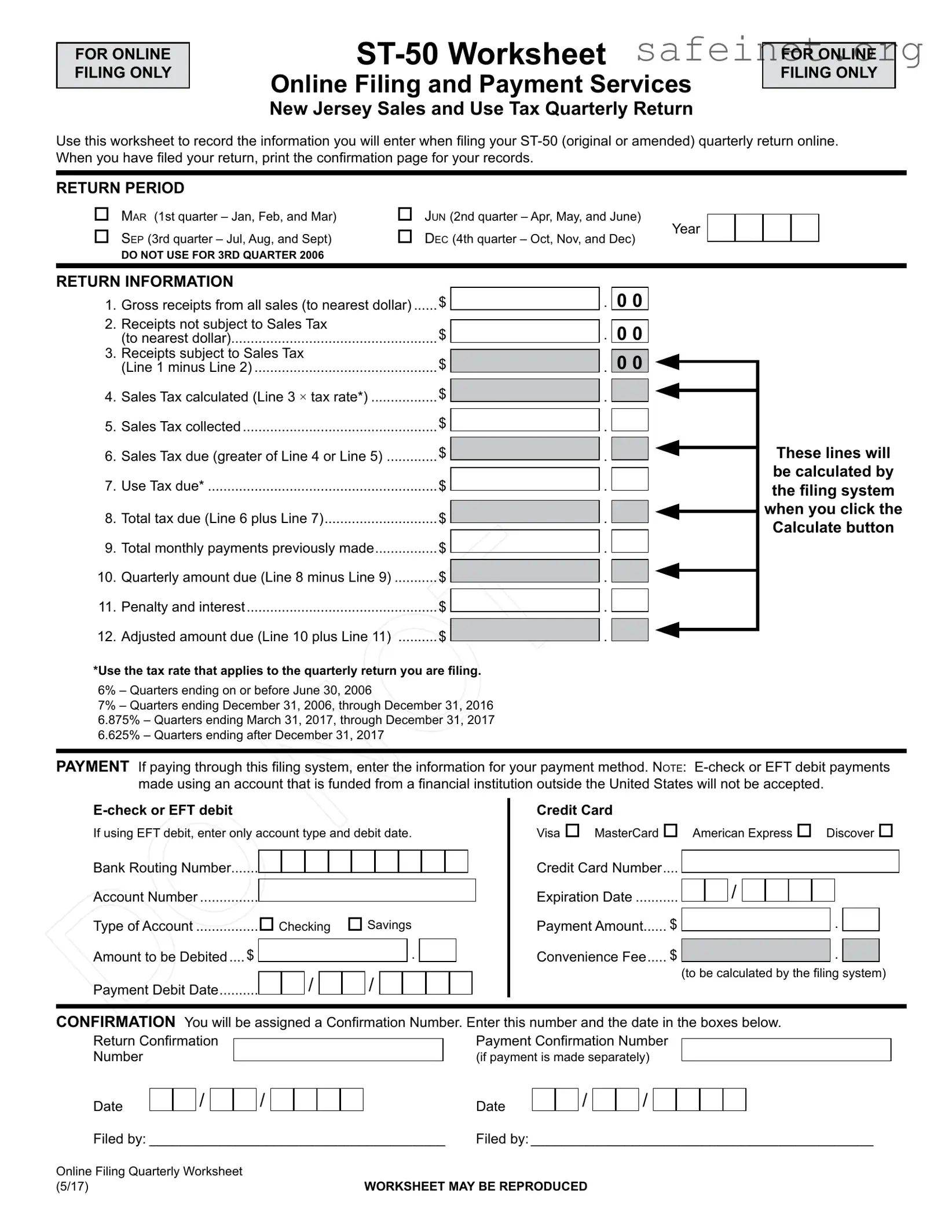
The New Jersey Sales Tax ST-50 form is an essential tool for businesses that need to report their sales and use tax on a quarterly basis. Designed for online filing, this form helps streamline the reporting process by allowing users to input their sales data directly into a digital worksheet. The ST-50 form covers various aspects, including gross receipts from sales, receipts that are not subject to sales tax, and the calculation of sales tax due. It also requires businesses to report any use tax owed, total tax due, and any prior payments made. Importantly, the form includes a section for penalties and interest, ensuring that businesses are aware of any additional amounts they may need to pay. After filling out the necessary information, businesses can submit their returns online and receive a confirmation number for their records. This form is not only a requirement for compliance but also a helpful way to keep track of tax obligations throughout the year.
FOR ONLINE FILING ONLY
Online Filing and Payment Services
New Jersey Sales and Use Tax Quarterly Return
FOR ONLINE FILING ONLY
Use this worksheet to record the information you will enter when filing your
RETURN PERIOD
|
Mar (1st quarter – Jan, Feb, and Mar) |
|
Sep (3rd quarter – Jul, Aug, and Sept) |
|
|
|
DO NOT USE FOR 3RD QUARTER 2006 |
|
Jun (2nd quarter – Apr, May, and June) |
Year |
|
Dec (4th quarter – Oct, Nov, and Dec) |
||
|
RETURN INFORMATION
1. |
Gross receipts from all sales (to nearest dollar) |
$ |
2. |
Receipts not subject to Sales Tax |
$ |
|
(to nearest dollar) |
|
3. |
Receipts subject to Sales Tax |
$ |
|
(Line 1 minus Line 2) |
|
4. |
Sales Tax calculated (Line 3 × tax rate*) |
$ |
5. |
Sales Tax collected |
$ |
6. |
Sales Tax due (greater of Line 4 or Line 5) |
$ |
7. |
Use Tax due* |
$ |
8. |
Total tax due (Line 6 plus Line 7) |
$ |
9. |
Total monthly payments previously made |
$ |
10. |
Quarterly amount due (Line 8 minus Line 9) |
$ |
11. |
Penalty and interest |
$ |
12. |
Adjusted amount due (Line 10 plus Line 11) |
$ |
. 0 0
. 0 0
. 0 0
.
.
.
.
.
.
.
.
.
These lines will be calculated by the filing system when you click the Calculate button
*Use the tax rate that applies to the quarterly return you are filing.
6% – Quarters ending on or before June 30, 2006
7% – Quarters ending December 31, 2006, through December 31, 2016 6.875% – Quarters ending March 31, 2017, through December 31, 2017 6.625% – Quarters ending after December 31, 2017
PAYMENT If paying through this filing system, enter the information for your payment method. Note:
If using EFT debit, enter only account type and debit date.
Bank Routing Number.......
Account Number................
Type of Account |
Checking |
Savings |
||||||||||||
Amount to be Debited..... $ |
|
|
|
|
|
|
|
|
|
|
|
|
|
|
|
|
|
|
|
|
|
|
|
. |
|
|
|
|
|
Payment Debit Date |
|
/ |
|
|
/ |
|
|
|
|
|
|
|
||
|
|
|
|
|
|
|
|
|
|
|||||
|
|
|
|
|
|
|
|
|
|
|
|
|
|
|
Credit Card
Visa MasterCard American Express Discover
Credit Card Number.... |
|
|
|
|
|
|
|
|
|
|
|
|
|
/ |
|
|
|
|
|
|
|
|
|
Expiration Date |
|
|
|
|
|
|
|
|
|
|
|
Payment Amount...... $ |
|
|
|
|
|||||||
|
. |
|
|
||||||||
Convenience Fee..... $ |
|
|
|
||||||||
|
|
|
|
|
|
|
. |
|
|
||
|
(to be calculated by the filing system) |
||||||||||
CONFIRMATION You will be assigned a Confirmation Number. Enter this number and the date in the boxes below.
Return Confirmation Number
Date/
/
Payment Confirmation Number
(if payment is made separately)
Date |
|
|
/ |
|
|
/ |
Filed by:_______________________________________ Filed by:_____________________________________________
Online Filing Quarterly Worksheet |
WORKSHEET MAY BE REPRODUCED |
(5/17) |
| Fact Name | Description |
|---|---|
| Purpose | The ST-50 form is used for filing New Jersey Sales and Use Tax quarterly returns online. |
| Return Periods | The form covers four quarters: January-March, April-June, July-September, and October-December. |
| Sales Tax Rates | Tax rates vary by quarter: 6% for quarters ending on or before June 30, 2006; 7% for quarters ending December 31, 2006, through December 31, 2016; 6.875% for quarters ending March 31, 2017, through December 31, 2017; and 6.625% for quarters after December 31, 2017. |
| Payment Methods | Payments can be made via e-check, EFT debit, or credit card. |
| Confirmation | After filing, a confirmation number will be assigned for record-keeping purposes. |
| Governing Law | The ST-50 form is governed by New Jersey Sales and Use Tax Law, N.J.S.A. 54:32B. |
| Calculations | Lines for gross receipts, sales tax collected, and total tax due are calculated automatically by the filing system. |
| Penalty and Interest | Any penalties or interest due must be calculated and added to the total amount owed. |
| Reproduction | The worksheet may be reproduced for filing purposes, as indicated on the form. |
Completing the NJ Sales Tax ST-50 form requires careful attention to detail. You will need to gather all relevant sales data for the specified quarter. After filling out the form, ensure you save a copy of the confirmation page for your records. Follow the steps below to accurately complete the form.
After completing the form, enter your payment information if you are paying through the online filing system. Make sure to provide the bank routing number and account number if using an e-check or EFT debit. If paying by credit card, fill in the credit card details as required. Once everything is filled out, submit the form and save your confirmation details for future reference.
What is the NJ Sales Tax ST-50 form?
The NJ Sales Tax ST-50 form is a quarterly return used by businesses to report and pay sales and use tax to the state of New Jersey. This form is specifically designed for online filing and helps businesses keep track of their gross receipts, tax collected, and any payments made during the quarter.
How do I determine which return period to select on the ST-50 form?
The return period corresponds to the quarter for which you are filing. You can choose from four options: March for the first quarter (January, February, March), June for the second quarter (April, May, June), September for the third quarter (July, August, September), and December for the fourth quarter (October, November, December). Ensure you select the correct quarter to avoid any filing issues.
What information do I need to complete the ST-50 form?
To complete the ST-50 form, you will need to gather information about your gross receipts from all sales, receipts not subject to sales tax, and receipts that are subject to sales tax. Additionally, you will calculate the sales tax due, any use tax owed, and total tax due. Be prepared to enter your payment details if you are paying through the online filing system.
How is the sales tax calculated on the ST-50 form?
Sales tax is calculated by taking the receipts subject to sales tax and multiplying that amount by the applicable tax rate for the quarter you are filing. The form provides a calculation line, but you must ensure you are using the correct tax rate based on the period you are reporting for. Rates have varied over the years, so double-check the current rate applicable to your filing.
What payment methods are accepted when filing the ST-50 form online?
You can pay using an e-check or EFT debit directly from your bank account, or by credit card. If you choose to pay by e-check, ensure that your account is with a financial institution located within the United States, as international accounts are not accepted. For credit card payments, you will need to provide your card details and may incur a convenience fee.
What should I do after filing the ST-50 form?
After you submit your ST-50 form, it is important to print the confirmation page for your records. This page will include a confirmation number, which you should keep in case of any discrepancies or questions about your filing. If you made a payment, be sure to also note the payment confirmation number and date.
What happens if I do not file the ST-50 form on time?
Failing to file the ST-50 form by the due date may result in penalties and interest charges. The form includes lines for reporting any penalties or interest that may apply, so it is crucial to file on time to avoid additional fees. If you anticipate a delay, consider filing an amended return or seeking assistance to ensure compliance.
Can I amend my ST-50 form after filing?
Yes, if you discover an error after filing your ST-50 form, you can submit an amended return online. It is essential to provide accurate information to avoid penalties and ensure your tax obligations are met. Follow the instructions for amending your return carefully to ensure that all corrections are properly documented.
Incorrect Tax Rate: Many people forget to use the correct tax rate for the quarter they are filing. Tax rates change, so it’s crucial to check which rate applies to your specific return period.
Missing Gross Receipts: Some filers overlook including all gross receipts from sales. Ensure you report the total amount accurately to avoid discrepancies.
Errors in Calculating Sales Tax: It's easy to miscalculate the sales tax due. Double-check your calculations to ensure you are paying the right amount.
Not Reporting Use Tax: If you have any purchases subject to use tax, failing to report this can lead to penalties. Make sure to include this in your total tax due.
Skipping Confirmation Steps: After filing, some forget to save or print the confirmation page. This step is important for your records and can help resolve any future issues.
The New Jersey Sales Tax ST-50 form is an essential document for businesses to report their sales tax obligations. Along with this form, several other documents are often utilized to ensure compliance with state tax regulations. Below are four commonly associated forms that may be required during the sales tax filing process.
Each of these forms plays a vital role in the sales tax process, ensuring that businesses remain compliant with New Jersey's tax laws. Understanding and utilizing these documents effectively can help streamline tax reporting and minimize potential issues with state tax authorities.
The New Jersey Sales Tax ST-50 form is similar to the IRS Form 1040, which is used for individual income tax returns. Both documents require taxpayers to report financial information over a specific period. Just as the ST-50 focuses on sales and use tax collected and owed, the 1040 details income earned and taxes owed based on that income. Each form necessitates accurate calculations to determine the total tax liability, ensuring compliance with federal and state tax regulations.
Another comparable document is the New Jersey Corporate Business Tax (CBT) form. Like the ST-50, the CBT form requires businesses to report financial data and calculate taxes owed based on their operations. Both forms demand clarity and accuracy in reporting gross receipts, deductions, and tax calculations. They serve as essential tools for the state to assess and collect revenue, reflecting the financial activities of businesses operating within New Jersey.
The ST-50 also resembles the New Jersey Employer Payroll Tax form. This document, used by employers to report wages paid and taxes withheld from employees, shares a similar structure in terms of financial reporting. Both forms require detailed information about taxable amounts and the calculation of taxes due. They are crucial for ensuring that businesses fulfill their tax obligations, contributing to state revenue while keeping accurate records of financial transactions.
Lastly, the New Jersey Use Tax form is akin to the ST-50 in that it addresses taxes on goods purchased for use in the state. Both forms require taxpayers to report taxable transactions and calculate the appropriate tax owed. The ST-50 focuses on sales tax collected, while the Use Tax form emphasizes tax owed on purchases where sales tax was not paid at the time of sale. Both documents are integral to maintaining compliance with New Jersey tax laws and ensuring that all taxable activities are accounted for.
When filling out the New Jersey Sales Tax ST-50 form, there are important steps to follow. Here is a list of what you should and shouldn’t do:
Understanding the New Jersey Sales Tax ST-50 form is essential for businesses to comply with state tax regulations. However, several misconceptions can lead to confusion and potential errors. Here are six common misconceptions:
This is not true. All businesses that sell taxable goods or services in New Jersey, regardless of size, must file the ST-50 form if they meet the sales threshold.
In reality, the ST-50 form must be filed quarterly. Missing deadlines can result in penalties and interest, so it’s crucial to adhere to the specific filing schedule.
This is misleading. While gross receipts are a starting point, businesses must subtract any receipts that are not subject to sales tax before calculating the tax due.
This is incorrect. Only specific payment methods, such as e-checks or credit cards, are accepted through the online filing system. Additionally, international accounts are not allowed for e-check payments.
This is a dangerous assumption. It is essential to keep a printed confirmation page and any related documents for your records. These may be necessary for future audits or inquiries.
This is not accurate. Tax rates and filing requirements can change. Businesses should always check for the latest updates to ensure compliance with current regulations.
Addressing these misconceptions is vital for businesses to avoid penalties and ensure proper compliance with New Jersey sales tax laws. Staying informed and organized will help streamline the filing process and maintain good standing with the state.
Here are some key takeaways about filling out and using the NJ Sales Tax ST-50 form: