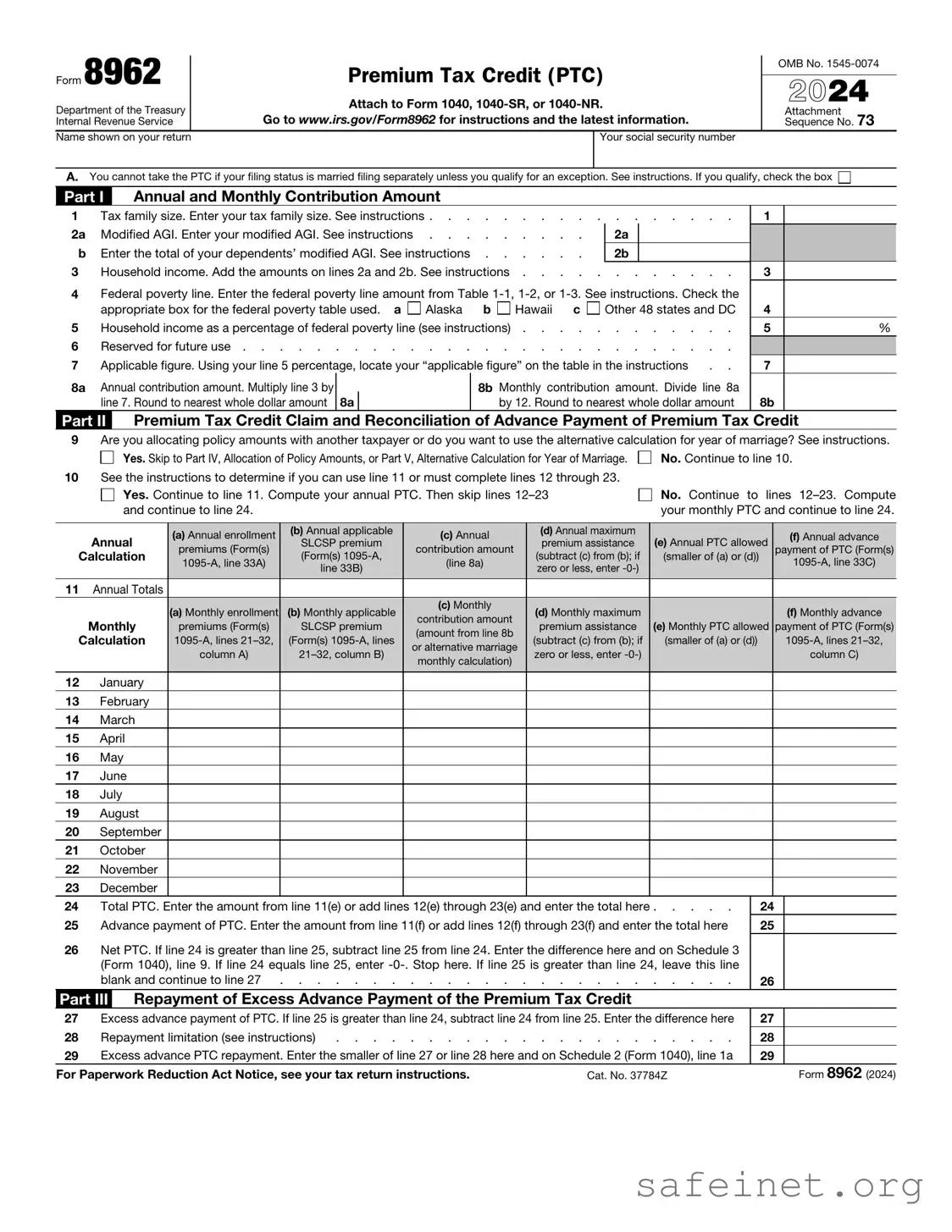
The IRS Form 8962, also known as the Premium Tax Credit form, plays a critical role in the Affordable Care Act (ACA) by helping individuals and families determine their eligibility for premium tax credits. This form is essential for those who purchased health insurance through the Health Insurance Marketplace. It allows taxpayers to calculate the amount of premium tax credit they are entitled to based on their income and family size. Additionally, Form 8962 requires taxpayers to reconcile any advance payments of the premium tax credit that were received during the year with the actual credit amount calculated on the form. Accurate completion of this form is vital, as it directly impacts the taxpayer's overall tax liability and eligibility for future health coverage. Understanding the nuances of Form 8962 can significantly affect financial planning and healthcare decisions for many Americans.
Form 8962
Department of the Treasury Internal Revenue Service
Name shown on your return
Premium Tax Credit (PTC)
Attach to Form 1040,
Go to www.irs.gov/Form8962 for instructions and the latest information.
Your social security number
OMB No.
2024
Attachment Sequence No. 73
A.You cannot take the PTC if your filing status is married filing separately unless you qualify for an exception. See instructions. If you qualify, check the box
Part I Annual and Monthly Contribution Amount
1 |
Tax family size. Enter your tax family size. See instructions |
. . . . . . . . |
|
1 |
|
||
2a |
Modified AGI. Enter your modified AGI. See instructions |
|
2a |
|
|
|
|
b |
Enter the total of your dependents’ modified AGI. See instructions |
|
2b |
|
|
|
|
3 |
Household income. Add the amounts on lines 2a and 2b. See instructions . . . . |
. . . . . . . . |
|
3 |
|
||
4Federal poverty line. Enter the federal poverty line amount from Table
|
appropriate box for the federal poverty table used. a |
Alaska |
b |
Hawaii |
c |
Other 48 states and DC |
4 |
|
|
5 |
Household income as a percentage of federal poverty line (see instructions) |
5 |
% |
||||||
6 |
Reserved for future use |
|
|
||||||
7 |
Applicable figure. Using your line 5 percentage, locate your “applicable figure” on the table in the instructions |
. . |
7 |
|
|||||
8a |
Annual contribution amount. Multiply line 3 by |
|
8b Monthly contribution amount. Divide line 8a |
|
|
||||
|
line 7. Round to nearest whole dollar amount 8a |
|
|
by 12. Round to nearest whole dollar amount |
8b |
|
|||
Part II Premium Tax Credit Claim and Reconciliation of Advance Payment of Premium Tax Credit
9Are you allocating policy amounts with another taxpayer or do you want to use the alternative calculation for year of marriage? See instructions.
Yes. Skip to Part IV, Allocation of Policy Amounts, or Part V, Alternative Calculation for Year of Marriage. |
No. Continue to line 10. |
10See the instructions to determine if you can use line 11 or must complete lines 12 through 23.
Yes. Continue to line 11. Compute your annual PTC. Then skip lines
No. Continue to lines
Annual |
(a) Annual enrollment |
(b) Annual applicable |
(c) Annual |
(d) Annual maximum |
(e) Annual PTC allowed |
(f) Annual advance |
|
SLCSP premium |
premium assistance |
||||||
premiums (Form(s) |
contribution amount |
payment of PTC (Form(s) |
|||||
Calculation |
(Form(s) |
(line 8a) |
(subtract (c) from (b); if |
(smaller of (a) or (d)) |
|||
|
line 33B) |
zero or less, enter |
|
||||
|
|
|
|
|
|||
|
|
|
|
|
|
|
11Annual Totals
|
(a) Monthly enrollment |
(b) Monthly applicable |
(c) Monthly |
(d) Monthly maximum |
|
(f) Monthly advance |
|
|
contribution amount |
|
|||||
Monthly |
premiums (Form(s) |
SLCSP premium |
premium assistance |
(e) Monthly PTC allowed |
payment of PTC (Form(s) |
||
(amount from line 8b |
|||||||
Calculation |
(Form(s) |
(subtract (c) from (b); if |
(smaller of (a) or (d)) |
||||
or alternative marriage |
|||||||
|
column A) |
zero or less, enter |
|
column C) |
|||
|
monthly calculation) |
|
|||||
|
|
|
|
|
|
||
|
|
|
|
|
|
|
12January
13February
14March
15April
16May
17June
18July
19August
20September
21October
22November
23December
24 |
Total PTC. Enter the amount from line 11(e) or add lines 12(e) through 23(e) and enter the total here |
24 |
25 |
Advance payment of PTC. Enter the amount from line 11(f) or add lines 12(f) through 23(f) and enter the total here |
25 |
26Net PTC. If line 24 is greater than line 25, subtract line 25 from line 24. Enter the difference here and on Schedule 3 (Form 1040), line 9. If line 24 equals line 25, enter
|
blank and continue to line 27 |
26 |
|
||
Part III |
Repayment of Excess Advance Payment of the Premium Tax Credit |
|
|
||
27 |
Excess advance payment of PTC. If line 25 is greater than line 24, subtract line 24 from line 25. Enter the difference here |
27 |
|
||
28 |
Repayment limitation (see instructions) |
28 |
|
||
29 |
Excess advance PTC repayment. Enter the smaller of line 27 or line 28 here and on Schedule 2 (Form 1040), line 1a |
29 |
|
||
For Paperwork Reduction Act Notice, see your tax return instructions. |
Cat. No. 37784Z |
|
Form 8962 (2024) |
||
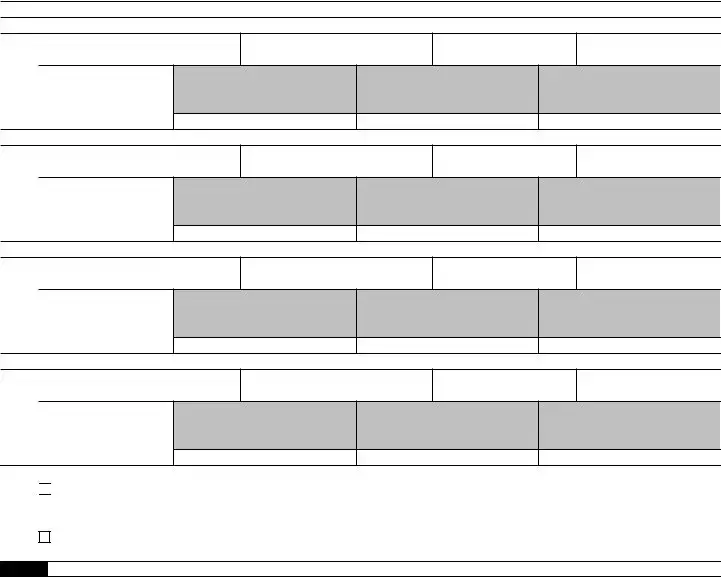
Form 8962 (2024) |
Page 2 |
|
Part IV |
Allocation of Policy Amounts |
|
Complete the following information for up to four policy amount allocations. See instructions for allocation details.
Allocation 1
30(a) Policy Number (Form
(b)SSN of other taxpayer
(c)Allocation start month
(d)Allocation stop month
Allocation percentage applied to monthly amounts
(e)Premium Percentage
(f)SLCSP Percentage
(g)Advance Payment of the PTC Percentage
Allocation 2
31(a) Policy Number (Form
(b)SSN of other taxpayer
(c)Allocation start month
(d)Allocation stop month
Allocation percentage applied to monthly amounts
(e)Premium Percentage
(f)SLCSP Percentage
(g)Advance Payment of the PTC Percentage
Allocation 3
32(a) Policy Number (Form
(b)SSN of other taxpayer
(c)Allocation start month
(d)Allocation stop month
Allocation percentage applied to monthly amounts
(e)Premium Percentage
(f)SLCSP Percentage
(g)Advance Payment of the PTC Percentage
Allocation 4
33(a) Policy Number (Form
(b)SSN of other taxpayer
(c)Allocation start month
(d)Allocation stop month
Allocation percentage applied to monthly amounts
(e)Premium Percentage
(f)SLCSP Percentage
(g)Advance Payment of the PTC Percentage
34Have you completed all policy amount allocations?
Yes. Multiply the amounts on Form
No. See the instructions to report additional policy amount allocations.
Part V Alternative Calculation for Year of Marriage
Complete line(s) 35 and/or 36 to elect the alternative calculation for year of marriage. For eligibility to make the election, see the instructions for line 9. To complete line(s) 35 and/or 36 and compute the amounts for lines
35 |
Alternative entries |
(a) |
Alternative family size |
(b) Alternative monthly |
(c) |
Alternative start month |
(d) |
Alternative stop month |
|
|
contribution amount |
|
|
|
|
||
|
for your SSN |
|
|
|
|
|
|
|
|
|
|
|
|
|
|
|
|
|
|
|
|
|
|
|
|
|
36 |
Alternative entries |
(a) |
Alternative family size |
(b) Alternative monthly |
(c) |
Alternative start month |
(d) |
Alternative stop month |
|
|
contribution amount |
|
|
|
|
||
|
for your spouse’s |
|
|
|
|
|
|
|
|
|
|
|
|
|
|
|
|
|
SSN |
|
|
|
|
|
|
|
|
|
|
|
|
|
|
|
Form 8962 (2024) |
| Fact Name | Description |
|---|---|
| Purpose | The IRS Form 8962 is used to calculate the Premium Tax Credit (PTC) for individuals and families who purchased health insurance through the Health Insurance Marketplace. |
| Eligibility | To qualify for the Premium Tax Credit, you must meet certain income requirements and not be eligible for other types of health coverage, such as Medicare or Medicaid. |
| Filing Deadline | This form must be filed with your federal tax return, typically by April 15th of the following year. Extensions may apply, but the credit is only available for the tax year in which you were eligible. |
| State-Specific Forms | Some states have their own forms related to the Premium Tax Credit. For example, California uses Form 3849 under the California Health and Safety Code. |
| Impact on Refunds | Claiming the Premium Tax Credit can significantly affect your tax refund. If you receive too much credit throughout the year, you may owe money back when you file your taxes. |
Filling out the IRS 8962 form is an important step in ensuring that you accurately report your premium tax credit. This form helps you reconcile the advance payments of the premium tax credit with the actual credit you qualify for based on your income and family size. Follow these steps to complete the form correctly.
After completing the form, you will need to submit it along with your tax return. Ensure that you keep copies of all documents for your records. If you have questions or need assistance, consider reaching out to a tax professional.
What is IRS Form 8962?
IRS Form 8962, also known as the Premium Tax Credit (PTC) form, is used to calculate and claim the premium tax credit for individuals and families who purchased health insurance through the Health Insurance Marketplace. This form helps determine eligibility for the credit and ensures that taxpayers receive the correct amount of financial assistance to help cover their insurance premiums.
Who needs to file Form 8962?
If you, your spouse, or a dependent received premium tax credits to help pay for health insurance coverage through the Health Insurance Marketplace, you must file Form 8962. This applies whether you received the credit in advance or claimed it when filing your tax return.
What information do I need to complete Form 8962?
To fill out Form 8962, you will need information from your Form 1095-A, Health Insurance Marketplace Statement. This includes details about the premiums you paid, the coverage you had, and the amount of premium tax credit you received. Additionally, you'll need your household income and the number of people in your household to determine your eligibility for the credit.
What happens if I don’t file Form 8962?
Failing to file Form 8962 when required can lead to significant consequences. The IRS may disallow your premium tax credit, resulting in a higher tax bill. Moreover, you may face delays in processing your tax return and potential penalties for not filing the required forms.
Can I amend my tax return if I made a mistake on Form 8962?
Yes, if you discover an error on your Form 8962 after submitting your tax return, you can amend your return using Form 1040-X. It’s important to correct any mistakes to ensure that you receive the appropriate amount of tax credit and avoid any issues with the IRS.
What if my income changes during the year?
If your income changes during the year, it’s crucial to report these changes to the Health Insurance Marketplace as soon as possible. This can affect your eligibility for premium tax credits. When you file your tax return, you will reconcile your actual income with the estimated income you provided when applying for coverage.
Is Form 8962 required for all taxpayers?
No, not all taxpayers need to file Form 8962. Only those who received premium tax credits through the Health Insurance Marketplace are required to file this form. If you did not receive any premium tax credits, you do not need to include Form 8962 with your tax return.
What is the deadline for filing Form 8962?
The deadline for filing Form 8962 coincides with the deadline for filing your federal income tax return. Typically, this is April 15th of the following year. However, if you file for an extension, you may have additional time to submit your tax return and Form 8962.
Can I get help with filling out Form 8962?
Absolutely! Many resources are available to assist you in completing Form 8962. You can seek help from a tax professional, utilize online tax preparation software, or consult the IRS website for guidance. Additionally, community organizations often offer free tax assistance programs during tax season.
Where can I find IRS Form 8962?
You can easily find IRS Form 8962 on the official IRS website. It is available for download in PDF format, along with instructions on how to complete it. Ensure you are using the most current version of the form to avoid any issues when filing your taxes.
Not including all required information. Ensure that every section is filled out completely. Missing information can lead to processing delays.
Incorrectly calculating the premium tax credit. Double-check your calculations to avoid underreporting or overreporting your credit.
Failing to attach the form to your tax return. The IRS requires Form 8962 to be submitted with your Form 1040 or 1040-SR.
Using outdated information. Always use the most recent tax year data when filling out the form.
Not verifying eligibility for the premium tax credit. Review the eligibility criteria carefully to ensure you qualify.
Forgetting to report all sources of income. Include all taxable income sources to accurately determine your eligibility for the credit.
Overlooking the importance of household size. Make sure to correctly report the number of people in your household, as this affects your premium tax credit.
Using the wrong filing status. Your filing status can impact your eligibility and the amount of your premium tax credit.
Neglecting to keep records. Maintain documentation of your health coverage and income to support your claims on the form.
Not reviewing the form before submission. Take a moment to check for errors or omissions to avoid complications later.
When filing your taxes, the IRS 8962 form is crucial for those who received premium tax credits under the Affordable Care Act. However, several other forms and documents often accompany it to ensure a complete and accurate tax return. Here’s a brief overview of these essential documents:
Gathering these documents will help streamline your tax filing process and ensure you take full advantage of any credits or deductions available to you. Always double-check that you have everything in order before submitting your return.
The IRS Form 1095-A, Health Insurance Marketplace Statement, is closely related to Form 8962. The 1095-A provides essential information about the health insurance coverage an individual has obtained through the Health Insurance Marketplace. It includes details such as the months of coverage, the premium amounts, and the individuals covered. This information is critical for completing Form 8962, as it helps taxpayers determine their eligibility for the Premium Tax Credit and calculate the amount they may claim on their tax return.
Form 1095-B, Health Coverage, is another document that bears similarities to Form 8962. This form is issued by health insurance providers and serves to verify that an individual had minimum essential coverage during the tax year. While it does not directly impact the Premium Tax Credit, it can be used alongside Form 8962 to confirm compliance with the Affordable Care Act’s individual mandate, which requires individuals to maintain health coverage.
Form 1095-C, Employer-Provided Health Insurance Offer and Coverage, also shares a connection with Form 8962. This form is provided by large employers and outlines the health insurance coverage offered to employees. It helps individuals understand their options regarding employer-sponsored insurance and can influence their decision to seek coverage through the Marketplace. While it does not directly affect the Premium Tax Credit, it provides context for understanding one’s health insurance landscape.
Form 1040, the U.S. Individual Income Tax Return, is essential for anyone filing taxes and relates to Form 8962 in that it is the primary document used to report income and claim tax credits. When taxpayers fill out Form 1040, they must include the information from Form 8962 to claim the Premium Tax Credit. This connection highlights the importance of accurate reporting and compliance with tax obligations.
Form 8862, Information to Claim Certain Credits After Disallowance, is relevant in situations where a taxpayer has previously been denied a tax credit. If a taxpayer’s claim for the Premium Tax Credit was disallowed in the past, they may need to file Form 8862 to re-establish their eligibility. This form ensures that individuals provide the necessary information to support their claim for credits they may be entitled to, including the Premium Tax Credit reported on Form 8962.
Form 8880, Credit for Qualified Retirement Savings Contributions, is another tax credit form that, like Form 8962, is used to claim a benefit on a tax return. While Form 8880 focuses on retirement savings contributions, both forms require taxpayers to provide detailed information about their financial situation. Understanding how these credits work can help individuals maximize their tax benefits and make informed decisions about their finances.
Finally, Form 8863, Education Credits, is similar in that it allows taxpayers to claim credits for educational expenses. Just as Form 8962 is used to calculate the Premium Tax Credit, Form 8863 helps individuals determine their eligibility for education-related tax benefits. Both forms emphasize the importance of understanding eligibility criteria and accurately reporting information to receive the credits for which one qualifies.
When filling out the IRS Form 8962, which is used to claim the Premium Tax Credit, it's important to be thorough and accurate. Here are some dos and don'ts to keep in mind:
By following these guidelines, you can help ensure that your experience with the IRS Form 8962 is as smooth as possible.
The IRS Form 8962, also known as the Premium Tax Credit form, is often misunderstood. Here are nine common misconceptions about this form, clarified for better understanding.
While primarily designed for marketplace enrollees, anyone who qualifies for the Premium Tax Credit must complete this form, regardless of how they obtained their health insurance.
If you received health insurance through the marketplace, you must file the form even if you did not receive a premium tax credit. This ensures accurate reporting of your health coverage.
This form applies to both individuals and families. Anyone who is part of a household that received premium tax credits must file the form.
Filing this form is mandatory if you received premium tax credits. Failing to file can lead to delays in processing your tax return and potential penalties.
This form must be filed along with your annual tax return. It cannot be submitted separately or at a different time.
Any discrepancies between the information on Form 8962 and your Form 1095-A must be addressed. Ignoring these issues can result in complications with your tax return.
Form 8962 can change from year to year. It is essential to review the form and instructions each tax season to ensure compliance with current regulations.
If you discover an error after filing, you can amend your tax return, including Form 8962. It is important to correct any inaccuracies to avoid potential penalties.
The Premium Tax Credit is available to a range of income levels, not just low-income individuals. Eligibility is based on household size and income relative to the federal poverty level.
The IRS Form 8962, also known as the Premium Tax Credit (PTC) form, is essential for those who have purchased health insurance through the Health Insurance Marketplace. Below are key takeaways to keep in mind when filling out and using this form:
Understanding these key points can help simplify the process of filling out and using IRS Form 8962, ensuring you maximize your benefits while remaining compliant with tax regulations.