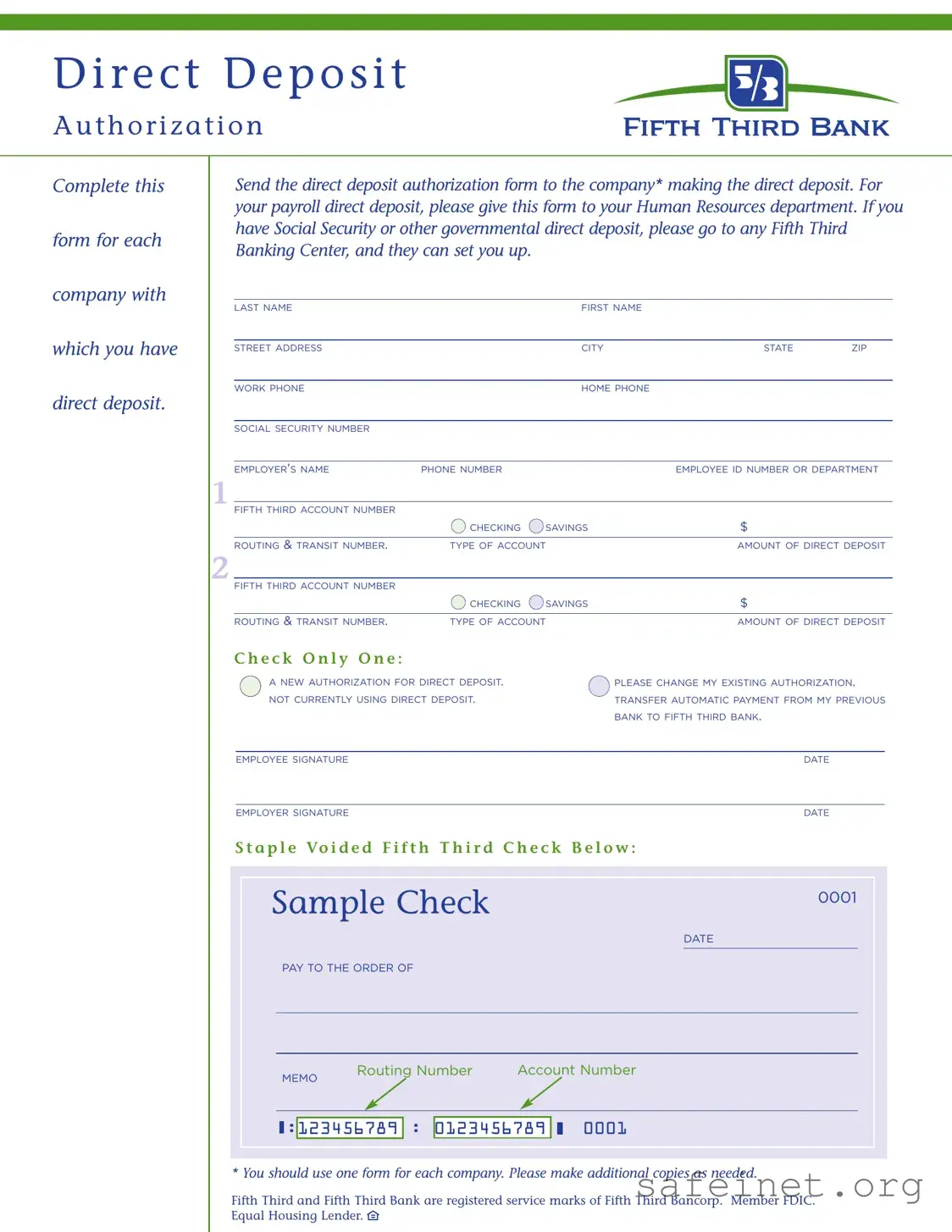
The Fifth Third Bank Direct Deposit form is an essential tool for anyone looking to streamline their payment processes. This form facilitates the direct deposit of funds from your employer or government agency directly into your Fifth Third Bank account. To complete the form, you will need to provide personal information, including your name, address, and Social Security number, as well as details about your employer and your specific Fifth Third Bank account. The form allows for multiple accounts, enabling you to designate different amounts for checking and savings accounts if desired. It also includes options for new authorizations, changes to existing deposits, or transferring automatic payments from another bank. By submitting this form to the appropriate entity, such as your employer’s Human Resources department or a government office, you can ensure that your payments are deposited efficiently and securely. Remember to sign the form and include the date to validate your request. Each company requires a separate form, so be prepared to make additional copies as needed.
| Fact Name | Description |
|---|---|
| Purpose | This form is used to authorize direct deposit for payments from your employer or government agencies. |
| Submission | After completing the form, send it to the company that will be making the direct deposit. |
| Payroll Direct Deposit | For payroll deposits, submit the form to your Human Resources department. |
| Government Payments | To set up direct deposit for Social Security or other government payments, visit a Fifth Third Banking Center. |
| Information Required | The form requires personal details such as your name, address, Social Security number, and bank account information. |
| Account Types | You can choose between checking or savings accounts for your direct deposit. |
| Authorization Options | Options include new authorization, changing existing authorization, or transferring automatic payments from another bank. |
| Signature Requirement | Both employee and employer signatures are required to finalize the authorization. |
| State-Specific Forms | Some states may have specific laws governing direct deposit forms. Always check local regulations. |
To complete the Fifth Third Bank Direct Deposit form, gather the necessary information before starting. Once the form is filled out, submit it to the appropriate company or department as directed.
What is the Fifth Third Bank Direct Deposit form used for?
The Fifth Third Bank Direct Deposit form is used to authorize your employer or other entities to deposit funds directly into your Fifth Third Bank account. This is a convenient way to receive payments such as your salary, Social Security benefits, or other government payments without the need for physical checks.
How do I complete the Direct Deposit form?
To complete the form, fill in your personal information, including your name, address, and Social Security number. You’ll also need to provide your employer’s details and your Fifth Third Bank account information, including the account number and routing number. Make sure to specify whether you want the deposit to go into a checking or savings account.
Where do I send the completed form?
After completing the form, send it to the company or organization that will be making the direct deposit. If it's for payroll, submit it to your Human Resources department. For Social Security or government payments, you can take the form to any Fifth Third Banking Center for assistance.
Can I use the same form for multiple direct deposits?
No, you should use one form for each company or entity with which you have direct deposit arrangements. If you have multiple employers or payment sources, make additional copies of the form as needed.
What if I want to change my existing direct deposit information?
If you need to change your existing direct deposit authorization, indicate this on the form by checking the appropriate box. Make sure to provide the updated account information and send it to your employer or payment source.
What if I am not currently using direct deposit?
If you are not currently using direct deposit but wish to start, simply check the box indicating a new authorization on the form. Fill in your banking details accurately to ensure a smooth setup.
How do I find my routing and transit number?
Your routing and transit number can typically be found on your checks or by contacting Fifth Third Bank directly. You can also find it on the bank's website or through your online banking account.
What if I have questions while filling out the form?
If you have questions while completing the form, don’t hesitate to reach out to your employer's HR department or visit a Fifth Third Banking Center. They can provide guidance and ensure that your direct deposit is set up correctly.
Is there a deadline for submitting the Direct Deposit form?
While there may not be a strict deadline, it’s best to submit your Direct Deposit form as soon as possible. This will help ensure that your payments are deposited into your account on time, especially around payroll dates or when starting new benefits.
What should I do if my direct deposit doesn’t go through?
If your direct deposit doesn’t appear in your account as expected, first check with your employer or payment source to confirm that they processed the deposit. If everything seems correct on their end, contact Fifth Third Bank for assistance in resolving the issue.
Incorrect Personal Information: Failing to provide accurate details such as your last name, first name, or social security number can lead to delays in processing your direct deposit.
Missing Employer Information: Not including your employer’s name and contact number can cause confusion and hinder the setup of your direct deposit.
Account Number Errors: Mistakes in entering your Fifth Third account number or routing number can result in funds being deposited into the wrong account.
Omitting Signature: Forgetting to sign the form is a common oversight that can delay the processing of your direct deposit authorization.
Choosing Incorrect Options: Selecting the wrong option regarding your direct deposit status, such as “not currently using direct deposit,” can lead to complications.
Not Submitting to the Right Department: Sending the form to the wrong department, instead of your Human Resources or the appropriate company contact, can result in unnecessary delays.
The Fifth Third Bank Direct Deposit form is essential for setting up direct deposit for payroll or government benefits. However, several other forms and documents are often needed in conjunction with this authorization. Below is a list of such documents, along with brief descriptions of each.
Each of these documents plays a significant role in ensuring that the direct deposit process is smooth and accurate. It is important to gather and complete these forms as needed to facilitate timely payments and maintain proper records.
The W-4 form is a document that employees fill out to inform their employer about their tax situation. It helps employers determine the correct amount of federal income tax to withhold from an employee's paycheck. Like the Fifth Third Bank Direct Deposit form, the W-4 requires personal information such as the employee's name, address, and Social Security number. Both forms are essential for ensuring that employees receive their pay accurately and on time, reflecting their financial preferences and obligations.
The ACH Authorization form is another document similar to the Fifth Third Bank Direct Deposit form. This form allows individuals to authorize a business or organization to electronically withdraw funds from their bank account. Just as with direct deposit, this process requires the account holder's bank information, including routing and account numbers. Both documents facilitate the smooth transfer of funds and require clear consent from the account holder to proceed with transactions.
The Payroll Deduction Authorization form is used by employees to authorize their employer to deduct specific amounts from their paychecks for various purposes, such as retirement plans or health insurance premiums. Like the direct deposit form, it requires personal details and account information. Both forms ensure that employees have control over their finances and how their pay is distributed, whether it's being deposited into a bank account or deducted for specific expenses.
The Social Security Direct Deposit form allows individuals to set up direct deposit for their Social Security benefits. This document, much like the Fifth Third Bank Direct Deposit form, requires personal information and bank account details to facilitate the electronic transfer of funds. Both forms aim to streamline the payment process, ensuring that individuals receive their funds promptly and securely.
The Automatic Bill Payment Authorization form is similar in that it allows individuals to set up automatic payments for recurring bills, such as utilities or subscriptions. This form requires the account holder's banking information and consent to withdraw funds on a set schedule. Just like the Fifth Third Bank Direct Deposit form, it emphasizes the importance of authorization and personal financial management, making it easier for individuals to stay on top of their payments without manual intervention.
When filling out the Fifth Third Bank Direct Deposit form, it's important to pay attention to detail. Here are seven things to keep in mind:
Following these guidelines will help ensure that your direct deposit is set up correctly and without delays.
Here are four common misconceptions about the Fifth Third Bank Direct Deposit form:
When filling out the Fifth Third Bank Direct Deposit form, there are several important points to keep in mind to ensure a smooth process. Below are key takeaways that will guide you through the completion and use of the form:
By following these guidelines, you can ensure that your direct deposit setup is completed efficiently and accurately.