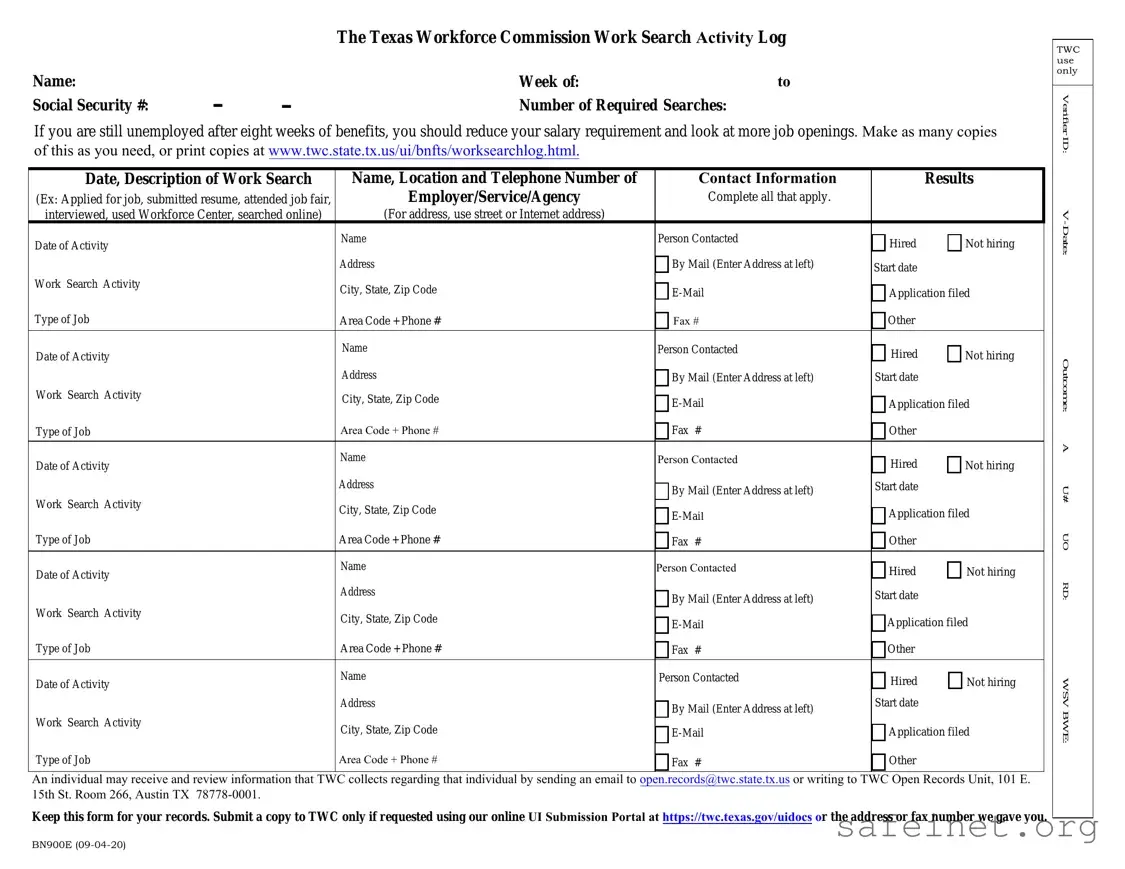
The Texas Workforce Commission (TWC) Work Search Activity Log serves as a crucial tool for individuals seeking employment while receiving unemployment benefits. This form is designed to track job search activities over a specified week, ensuring that claimants meet the requirements for continued benefits. Key sections of the log include personal identification details, such as the claimant's name and Social Security number, as well as the number of job searches required during the reporting period. Each entry in the log captures essential information, including the date of the activity, a description of the job search efforts, and the results of those efforts, such as whether the individual applied for a job, submitted a resume, or attended a job fair. Additionally, contact details for employers or agencies are recorded, providing a comprehensive overview of the job search process. It is important for individuals to keep this form for their records and submit it to TWC only if requested. Understanding how to properly fill out and maintain this log can significantly impact the job search experience, especially for those who may be facing challenges in securing employment.

| Fact Name | Description |
|---|---|
| Purpose | The TWC Work Search Activity Log is designed to help individuals track their job search efforts while receiving unemployment benefits. |
| Required Searches | Individuals must complete a specified number of job searches to remain eligible for unemployment benefits. |
| Submission Guidelines | Keep the log for personal records. Submit a copy to TWC only if requested. |
| Contact Information | Each entry must include the name, location, and contact details of the employer or agency contacted. |
| Job Search Activities | Activities can include applying for jobs, attending job fairs, or using Workforce Centers. |
| Record Keeping | It is essential to maintain accurate records of job search activities for verification purposes. |
| Governing Law | This form is governed by Texas unemployment law, which outlines the requirements for job search documentation. |
| Duration of Benefits | After eight weeks of unemployment benefits, individuals are encouraged to broaden their job search criteria. |
| Email for Records | Individuals can request to review their information collected by TWC via email at [email protected]. |
| Online Resources | Additional copies of the log can be printed from the TWC website at www.twc.state.tx.us/ui/bnfts/worksearchlog.html. |
Filling out the Texas Workforce Commission Work Search Activity Log is essential for documenting your job search efforts. This log helps ensure compliance with unemployment benefit requirements. Below are the steps to accurately complete the form.
After completing the form, ensure that all information is accurate and complete. Retain a copy for your own documentation, as it may be needed for future reference or verification.
What is the Texas Workforce Commission Work Search Activity Log?
The Texas Workforce Commission Work Search Activity Log is a form used by individuals receiving unemployment benefits in Texas. It helps track job search activities, including applications submitted, interviews attended, and other relevant actions taken to secure employment.
Who needs to complete the Work Search Activity Log?
How many job searches must I record on the log?
The number of required searches can vary based on individual circumstances. However, it is generally recommended that you record as many job search activities as possible. If you remain unemployed after eight weeks of benefits, consider increasing your job search efforts and possibly adjusting your salary expectations.
How do I obtain more copies of the Work Search Activity Log?
You can make copies of the Work Search Activity Log as needed. Alternatively, you can print additional copies directly from the TWC website at www.twc.state.tx.us/ui/bnfts/worksearchlog.html.
What information do I need to fill out on the log?
Each entry on the log requires the date of activity, a description of the work search, the name of the person contacted, the employer's address, and the contact information, including phone number and email. You should also note the results of each job search activity, such as whether you applied for a job or attended a job fair.
What should I do with the completed Work Search Activity Log?
Keep the completed Work Search Activity Log for your records. You only need to submit a copy to the TWC if specifically requested. If required, you can submit it using the online UI Submission Portal or by the address or fax number provided by TWC.
Can I access my personal information collected by TWC?
Yes, individuals have the right to access and review their personal information collected by the Texas Workforce Commission. To do this, you can send an email to [email protected] or write to the TWC Open Records Unit at the provided address.
What should I do if I have more questions about the Work Search Activity Log?
If you have further questions or need assistance regarding the Work Search Activity Log, you may contact the Texas Workforce Commission directly or visit their website for additional resources and support.
Failing to include your full name at the top of the form. This is essential for proper identification.
Not specifying the week of dates accurately. Ensure you indicate the correct time frame for your job search activities.
Omitting your Social Security number. This number is crucial for processing your information.
Not filling in the number of required searches. This field helps track your job search efforts.
Neglecting to describe each work search activity clearly. Use specific terms like “applied for job” or “attended job fair” to convey your efforts.
Forgetting to include the contact information for each employer or agency. This should include the name, location, and phone number.
Not indicating the results of each job search activity. This could be whether you were hired or if the employer is not hiring.
Leaving out the dates of activity. Each entry should have a date to show when the job search took place.
Failing to keep a copy of the form for your records. Always maintain a personal copy for reference.
Submitting the form without checking for accuracy. Double-check all entries to avoid mistakes that could affect your benefits.
When navigating the job search process, several forms and documents complement the Texas Workforce Commission (TWC) Work Search Log. Each document serves a specific purpose and may assist individuals in tracking their job search efforts effectively. Below is a list of common forms that are often utilized alongside the Work Search Log.
Using these documents in conjunction with the TWC Work Search Log can enhance the job search process. Each form plays a unique role, contributing to a comprehensive approach that may improve the chances of securing employment.
The Job Search Record form is similar to the Texas Workforce Commission Work Search Activity Log in that both documents are designed to track job search efforts. Individuals use the Job Search Record to document their activities, including applications submitted, interviews attended, and other job-seeking actions. This form typically requires the name of the employer, the date of contact, and the outcome of each job search activity, making it a useful tool for keeping a comprehensive record of one’s job search journey.
The Employment Services Job Search Log also shares similarities with the TWC Work Search Log. This document is often utilized by job seekers to outline their search activities, including networking efforts and job fairs attended. Like the TWC log, it includes sections for contact information, dates of activities, and results. This log serves as a structured way for individuals to reflect on their job search efforts and can be beneficial when reporting to employment agencies.
The Weekly Job Search Summary is another document that parallels the TWC Work Search Activity Log. This summary allows individuals to compile their job search efforts over a week, providing a snapshot of their activities. It includes fields for the number of applications submitted, interviews scheduled, and follow-ups made. By summarizing these efforts, individuals can better assess their job search strategies and make necessary adjustments.
The Unemployment Insurance Work Search Log is also quite similar, as it is specifically tailored for individuals receiving unemployment benefits. This log not only tracks job search activities but also ensures compliance with the requirements set forth by unemployment agencies. It includes sections for documenting job applications, interviews, and any other relevant activities, helping individuals maintain eligibility for benefits.
The Job Search Tracking Sheet serves a similar purpose by allowing job seekers to organize their search activities in a clear and concise manner. This sheet typically includes columns for the date, job title, company name, and status of the application. By keeping a detailed record, individuals can easily follow up on their applications and remain proactive in their job search.
The Career Exploration Log is another comparable document that encourages individuals to track their research on potential employers and industries. This log helps job seekers document the companies they are interested in, the roles they are exploring, and the skills required for those positions. It aids in creating a focused job search strategy by aligning interests with job opportunities.
The Networking Activity Log is also similar, as it focuses specifically on the networking aspect of job searching. This log allows individuals to record interactions with contacts, including dates, names, and outcomes of networking efforts. Like the TWC Work Search Log, it emphasizes the importance of building connections in the job market and encourages proactive engagement.
The Job Application Tracker is another document that mirrors the TWC Work Search Activity Log. This tracker is specifically designed to monitor the status of job applications. It includes sections for the date of application, company name, position applied for, and follow-up dates. By maintaining this tracker, individuals can stay organized and ensure they are effectively managing their job applications.
Finally, the Interview Preparation Checklist bears similarities to the TWC Work Search Activity Log in that it helps individuals prepare for job interviews. While it does not track job search activities directly, it outlines the steps needed to prepare for interviews, including researching the company, practicing answers to common questions, and preparing questions to ask the interviewer. This document supports the overall job search process by ensuring candidates are well-prepared for interviews.
When filling out the Example of TWC Work Search Log form, follow these guidelines to ensure accuracy and compliance:
By adhering to these do's and don'ts, you will ensure that your work search log is completed correctly and efficiently.
Understanding the Texas Workforce Commission (TWC) Work Search Log form can be challenging, especially with the various misconceptions surrounding it. Here are six common misunderstandings:
By clarifying these misconceptions, individuals can better navigate the job search process and ensure compliance with TWC requirements.
When using the Example of TWC Work Search Log form, consider the following key takeaways: