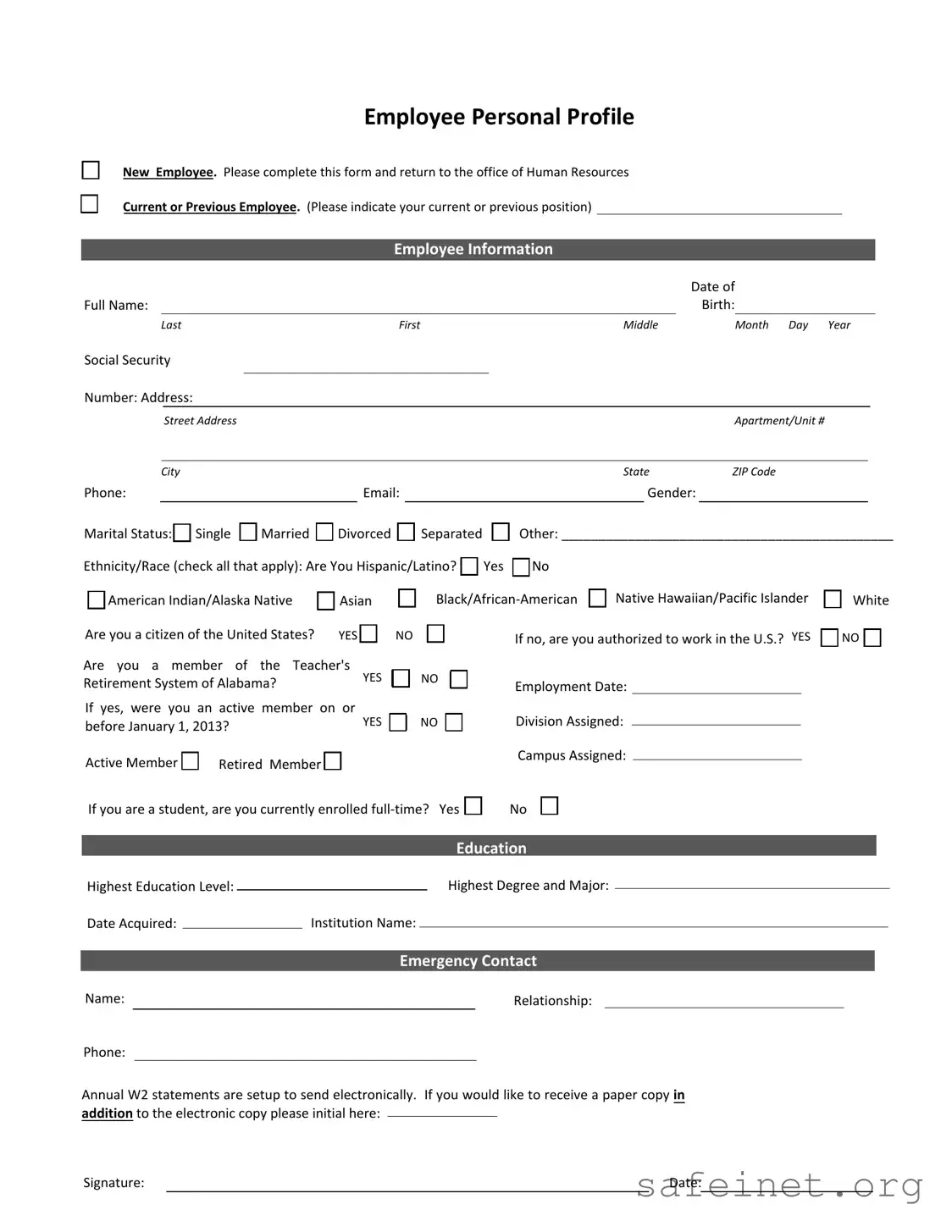
The Employee Profile form is an essential document designed to gather important information about both new and current employees. This form serves multiple purposes, helping Human Resources maintain accurate records while ensuring compliance with various employment regulations. It begins by collecting personal details such as the employee's full name, date of birth, and Social Security number. Additionally, it asks for contact information, including the employee's address, phone number, and email. The form also inquires about the employee's gender, marital status, and ethnicity or race, allowing for a comprehensive understanding of the workforce's diversity. Furthermore, it addresses citizenship status and work authorization, which are critical for legal employment in the United States. For those involved in the Teacher's Retirement System of Alabama, the form includes specific questions regarding membership status. Educational background is another key aspect, as it captures the highest level of education attained, along with the institution's name and the date the degree was acquired. Lastly, the form emphasizes the importance of having an emergency contact listed, ensuring that employees are supported in times of need. By completing the Employee Profile form, individuals contribute to a smooth onboarding process and help foster a supportive work environment.

| Fact Name | Details |
|---|---|
| Purpose | The Employee Profile form collects essential personal and employment information from new or current employees. |
| Governing Law | This form complies with federal and state employment laws, including the Fair Labor Standards Act (FLSA) and applicable state labor regulations. |
| Personal Information | Employees must provide their full name, date of birth, social security number, and contact details. |
| Employment Status | The form distinguishes between new and previous employees, requiring clarification on the current or previous position held. |
| Demographic Data | Employees are asked about their gender, marital status, and ethnicity/race to promote diversity and inclusion. |
| Citizenship Status | Employees must confirm their citizenship and whether they are authorized to work in the U.S. |
| Retirement System | The form inquires if the employee is a member of the Teacher's Retirement System of Alabama, including details about active membership. |
| Education Information | Employees are required to provide their highest education level, degree, major, and the institution from which they graduated. |
| Emergency Contact | An emergency contact's name, relationship, and phone number must be provided for safety and communication purposes. |
After completing the Employee Profile form, submit it to the Human Resources office. Ensure that all sections are filled out accurately to avoid delays in processing.
What is the purpose of the Employee Profile form?
The Employee Profile form collects essential information about employees, both new and current. This information helps Human Resources maintain accurate records, ensure compliance with regulations, and provide necessary support to employees throughout their tenure.
Who needs to complete the Employee Profile form?
All new employees must complete the form upon hiring. Current or previous employees may also need to fill it out if there are changes in their personal information or employment status.
What information is required on the form?
The form requires personal details such as full name, date of birth, social security number, address, phone number, email, gender, marital status, and ethnicity/race. Additionally, it asks about citizenship status, Teacher's Retirement System membership, employment date, education, and emergency contact information.
How is the information from the Employee Profile form used?
The information collected is used for various HR functions, including payroll processing, benefits administration, and compliance with federal and state regulations. It also assists in maintaining up-to-date employee records.
Can I update my information after submitting the form?
Yes, employees can update their information at any time. It is important to inform Human Resources of any changes to ensure that records remain accurate and current.
Is my personal information kept confidential?
Yes, all personal information provided on the Employee Profile form is treated with strict confidentiality. It is only accessible to authorized HR personnel and is protected in accordance with privacy laws and company policies.
What should I do if I am not a U.S. citizen?
If you are not a U.S. citizen, you will need to indicate your citizenship status on the form. You should also provide information regarding your authorization to work in the U.S. This ensures compliance with employment eligibility requirements.
How do I receive my annual W2 statements?
Annual W2 statements are set up for electronic delivery. If you prefer to receive a paper copy in addition to the electronic version, you can indicate this preference by initialing the appropriate section on the form.
Failing to provide full legal name. It is important to include the last, first, and middle names as they appear on official documents.
Omitting the Social Security Number. This number is crucial for identification and tax purposes.
Not completing the address section fully. All fields, including street address, apartment/unit number, city, state, and ZIP code, must be filled out.
Inaccurately indicating marital status. Ensure that the correct status is selected, as this can affect benefits and tax withholdings.
Neglecting to check all applicable ethnicity/race options. This information is often used for statistical purposes and should be as accurate as possible.
Incorrectly answering the citizenship question. It is essential to answer truthfully regarding citizenship and work authorization.
Overlooking the emergency contact section. Providing a name, relationship, and phone number is vital for urgent situations.
Not indicating the highest education level and degree. This information is important for employment records and qualifications.
Failing to sign and date the form. A signature is required to validate the information provided.
Forgetting to initial for paper W2 statements. If a paper copy is desired, it is necessary to indicate this preference.
The Employee Profile form is an essential document that collects vital information about new and current employees. However, several other forms and documents are often required to complement this profile. Each of these documents serves a specific purpose in the onboarding and employment process, ensuring that both the employee and employer are aligned and compliant with various regulations.
Understanding these documents and their purposes is crucial for both employees and employers. Properly completing and submitting these forms helps facilitate a smooth onboarding process and ensures compliance with various legal and organizational requirements.
The Employee Profile form is similar to a Job Application form, which is often the first step in the hiring process. Like the Employee Profile, a Job Application collects personal information, including full name, contact details, and employment history. Both forms aim to provide employers with a comprehensive view of a candidate's background and qualifications, ensuring that the right information is gathered for decision-making.
Another document that resembles the Employee Profile is the I-9 Employment Eligibility Verification form. This form is essential for verifying an employee's identity and legal authorization to work in the United States. Similar to the Employee Profile, the I-9 requires personal details such as name, address, and Social Security number. Both documents serve to protect the employer by ensuring compliance with federal regulations regarding employment eligibility.
The W-4 form is also akin to the Employee Profile. It is used to determine the amount of federal income tax to withhold from an employee's paycheck. Like the Employee Profile, the W-4 gathers personal information, including marital status and number of dependents. This ensures that employees have the correct tax deductions, making it a vital part of the employment process.
Another similar document is the Benefits Enrollment form, which employees complete to select their health insurance and other benefits. The Employee Profile includes questions about marital status and dependents, which are also relevant for benefits eligibility. Both documents help employers manage employee benefits effectively and ensure that employees receive the coverage they need.
The Performance Review form shares similarities with the Employee Profile as well. While the Employee Profile collects initial information, the Performance Review evaluates an employee's performance over time. Both forms contain personal information and are used by HR to track employee development and ensure that all necessary details are documented for future reference.
Employee Handbook Acknowledgment forms are another document type that aligns with the Employee Profile. When employees receive an Employee Handbook, they often sign an acknowledgment form confirming they have read and understood the policies. Similar to the Employee Profile, this form requires personal information and helps maintain clear communication between the employer and employee regarding workplace expectations.
The Direct Deposit Authorization form is closely related to the Employee Profile as well. This document allows employees to authorize the direct deposit of their paychecks into their bank accounts. It collects personal information, including bank details, similar to how the Employee Profile collects contact and identification information, ensuring that employees receive their wages promptly and securely.
Tax forms, such as the State Tax Withholding form, are also similar to the Employee Profile. This form allows employees to specify their state tax withholding preferences. Just like the Employee Profile, it collects personal information that is crucial for accurate tax reporting and compliance with state regulations.
Lastly, the Confidentiality Agreement shares common ground with the Employee Profile. This document outlines an employee's obligation to protect sensitive company information. While the Employee Profile focuses on personal and employment details, both documents are essential in establishing a clear understanding of the employee's role and responsibilities within the organization.
When filling out the Employee Profile form, it’s important to be thorough and accurate. Here are some guidelines to help you navigate the process smoothly:
By following these guidelines, you can ensure that your Employee Profile form is completed correctly and efficiently.
Misconceptions about the Employee Profile form can lead to confusion and miscommunication. Here are six common misunderstandings:
Filling out the Employee Profile form is a straightforward process, but attention to detail is essential. Here are key takeaways to ensure accuracy and completeness:
Completing this form accurately helps ensure that your employment records are correct and up to date.