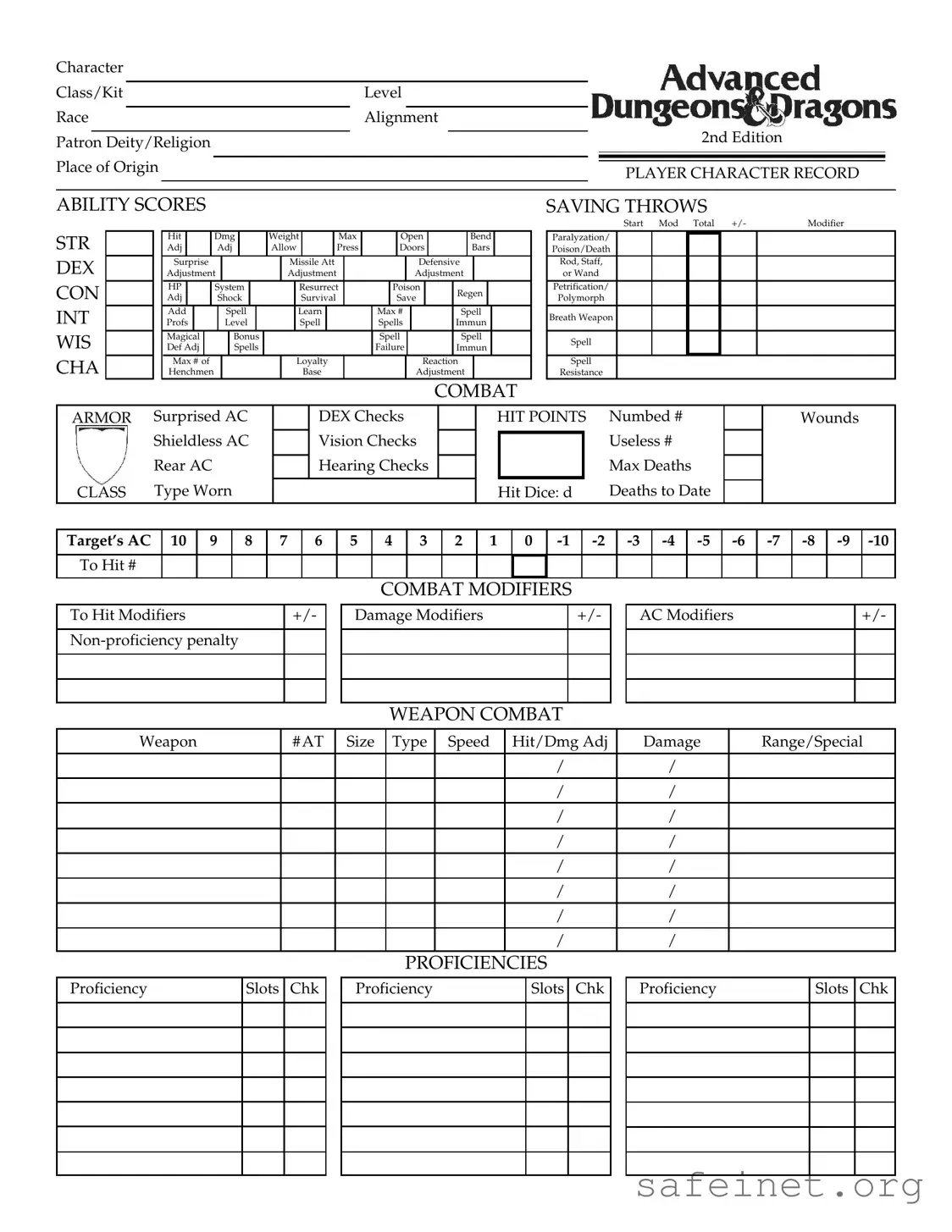
The Add Character Sheet form serves as a comprehensive tool for players to meticulously document their character's attributes and capabilities in a role-playing game. This form encompasses a wide array of essential details, including character class, level, race, and alignment, providing a foundational understanding of the character's identity. Players can specify their character's patron deity or religion, as well as their place of origin, which adds depth to the narrative. The form captures critical ability scores such as strength, dexterity, constitution, intelligence, wisdom, and charisma, each influencing gameplay mechanics like hit points and combat effectiveness. Combat statistics, including saving throws and modifiers, are detailed to facilitate strategic decision-making during encounters. Additionally, the sheet allows for the tracking of proficiencies, equipment, movement rates, and experience points, ensuring players have a clear overview of their character's progression and capabilities. The inclusion of background history and family charts enriches the storytelling aspect, enabling players to weave intricate narratives around their characters. As such, the Add Character Sheet form is not merely a collection of statistics; it is a vital component that enhances the immersive experience of role-playing games.
Character
Class/Kit |
Level |
|
||||||||
|
|
|
|
|
|
|
|
|
|
|
Race |
Alignment |
|
||||||||
|
|
|
|
|
|
|
|
|
2nd Edition |
|
Patron Deity/Religion |
|
|
|
|
|
|||||
|
|
|
|
|
|
|||||
|
|
|
|
|
|
|
|
|
|
|
Place of Origin |
|
|
|
|
|
|
||||
|
|
|
|
PLAYER CHARACTER RECORD |
|
|||||
|
|
|
|
|
|
|
|
|
|
|
|
|
|
|
|
|
|
|
|
|
|
ABILITY SCORES
STR |
|
|
Hit |
|
|
|
Dmg |
|
|
Weight |
|
|
Max |
|
|
|
Open |
|
|
|
Bend |
|
|||||||||||||||
|
|
Adj |
|
|
|
|
Adj |
|
|
Allow |
|
|
Press |
|
|
|
Doors |
|
|
|
Bars |
|
|||||||||||||||
DEX |
|
|
Surprise |
|
|
|
|
|
|
|
|
|
Missile Att |
|
|
|
|
|
|
|
Defensive |
|
|||||||||||||||
|
|
Adjustment |
|
|
|
Adjustment |
|
|
|
|
|
|
|
Adjustment |
|
||||||||||||||||||||||
CON |
|
|
HP |
|
|
|
System |
|
|
|
|
|
Resurrect |
|
|
|
Poison |
|
|
Regen |
|
|
|||||||||||||||
|
|
Adj |
|
|
|
|
|
Shock |
|
|
|
|
|
|
Survival |
|
|
|
|
|
Save |
|
|
|
|
||||||||||||
|
|
|
|
|
|
|
|
|
|
|
|
|
|
|
|
|
|
|
|
|
|
|
|
||||||||||||||
INT |
|
|
Add |
|
|
|
Spell |
|
|
|
|
Learn |
|
|
|
|
|
Max # |
|
|
|
Spell |
|
||||||||||||||
|
|
Profs |
|
|
|
Level |
|
|
|
|
Spell |
|
|
|
|
|
Spells |
|
|
|
Immun |
|
|||||||||||||||
WIS |
|
|
Magical |
|
|
|
|
|
Bonus |
|
|
|
|
|
|
|
|
|
|
Spell |
|
|
|
|
Spell |
|
|||||||||||
|
|
Def Adj |
|
|
|
|
|
Spells |
|
|
|
|
|
|
|
|
|
|
Failure |
|
|
|
|
Immun |
|
||||||||||||
CHA |
|
|
Max # of |
|
|
|
|
|
|
|
|
|
|
Loyalty |
|
|
|
|
|
|
|
Reaction |
|
||||||||||||||
|
|
Henchmen |
|
|
|
|
|
|
|
|
|
|
|
Base |
|
|
|
|
|
|
|
Adjustment |
|
||||||||||||||
COMBAT
SAVING THROWS
Start Mod Total +/- |
Modifier |
Paralyzation/
Poison/Death
Rod, Staff, or Wand
Petrification/
Polymorph
Breath Weapon
Spell
Spell
Resistance
ARMOR |
Surprised AC |
|
|
DEX Checks |
|
|
HIT POINTS |
Numbed # |
|
|
|
Wounds |
|||||||||||||||||
|
Shieldless AC |
|
|
Vision Checks |
|
|
|
|
|
|
|
Useless # |
|
|
|
|
|
|
|||||||||||
|
|
|
|
|
|
|
|
|
|
|
|
|
|
|
|
||||||||||||||
|
Rear AC |
|
|
Hearing Checks |
|
|
|
|
|
|
|
Max Deaths |
|
|
|
|
|
|
|||||||||||
|
|
|
|
|
|
|
|
|
|
|
|
|
|
|
|
||||||||||||||
CLASS |
Type Worn |
|
|
|
|
|
|
|
|
|
Hit Dice: d |
Deaths to Date |
|
|
|
|
|
|
|||||||||||
|
|
|
|
|
|
|
|
|
|
|
|
|
|
|
|
|
|
|
|
|
|
|
|
|
|
||||
Target’s AC |
|
10 |
9 |
8 |
|
7 |
6 |
5 |
4 |
3 |
2 |
1 |
0 |
|
|
||||||||||||||
|
|
|
|
|
|
|
|
|
|
|
|
|
|
|
|
|
|
|
|
|
|
|
|
|
|
|
|
|
|
To Hit # |
|
|
|
|
|
|
|
|
|
|
|
|
|
|
|
|
|
|
|
|
|
|
|
|
|
|
|
|
|
COMBAT MODIFIERS
To Hit Modifiers |
+/- |
Damage Modifiers
+/-
AC Modifiers
+/-
WEAPON COMBAT
Weapon |
# AT |
Size |
Type |
Speed |
Hit/Dmg Adj |
Damage |
Range/Special |
|
|
|
|
|
/ |
/ |
|
|
|
|
|
|
/ |
/ |
|
|
|
|
|
|
/ |
/ |
|
|
|
|
|
|
/ |
/ |
|
|
|
|
|
|
|
|
|
|
|
|
|
|
/ |
/ |
|
|
|
|
|
|
|
|
|
|
|
|
|
|
/ |
/ |
|
|
|
|
|
|
/ |
/ |
|
|
|
|
|
|
|
|
|
|
|
|
|
|
/ |
/ |
|
|
|
|
PROFICIENCIES |
|
|
||
Proficiency
Slots Chk
Proficiency
Slots Chk
Proficiency
Slots Chk
EQUIPMENT
Item |
|
Location |
Wt |
|
|
Item |
|
Location |
Wt |
Item |
Location |
Wt |
||||||||
|
|
|
|
|
|
|
|
|
|
|
|
|
|
|
|
|
|
|
|
|
|
|
|
|
|
|
|
|
|
|
|
|
|
|
|
|
|
|
|
|
|
|
|
|
|
|
|
|
|
|
|
|
|
|
|
|
|
|
|
|
|
|
|
|
|
|
|
|
|
|
|
|
|
|
|
|
|
|
|
|
|
|
|
|
|
|
|
|
|
|
|
|
|
|
|
|
|
|
|
|
|
|
|
|
|
|
|
|
|
|
|
|
|
|
|
|
|
|
|
|
|
|
|
|
|
|
|
|
|
|
|
|
|
|
|
|
|
|
|
|
|
|
|
|
|
|
|
|
|
|
|
|
|
|
|
|
|
|
|
|
|
|
|
|
|
|
|
|
|
|
|
|
|
|
|
|
|
|
|
|
|
|
|
|
|
|
|
|
|
|
|
|
|
|
|
|
|
|
|
|
|
|
|
|
|
|
|
|
|
|
|
|
|
|
|
|
|
|
|
|
|
|
|
|
|
|
|
|
|
|
|
|
|
|
|
|
|
|
|
|
|
|
|
|
|
|
|
|
|
|
|
|
|
|
|
|
|
|
|
|
|
|
|
|
|
|
|
|
|
|
|
|
Total Weight |
|
|
|
|
|
Encumbrance |
|
|
|
Movement Rate |
|
|
|
|||||||
|
MOVEMENT |
|
|
|
|
|
|
EXPERIENCE |
|
|
|
|||||||||
|
|
|
|
|
|
|
|
|
|
|
|
|
|
|
||||||
Movement |
Rate |
|
Movement |
|
Rate |
|
Total XPs |
|
XPs Needed for Next Level |
|||||||||||
|
|
|
|
|
|
|
|
|
|
|
|
|
|
|
|
|
|
|
|
|
Base |
|
|
|
Run (x 5) |
|
|
|
|
|
|
|
|
|
|
|
|
|
|||
|
|
|
|
|
|
|
|
|
|
|
|
|
|
|
|
|
|
|
|
|
Jog (x 2) |
|
|
|
|
Day |
|
|
|
|
|
|
|
|
|
|
|
|
|
||
|
|
|
|
|
|
|
|
|
|
|
|
|
|
|
|
|
|
|||
Run (x 3) |
|
|
|
|
|
|
|
|
|
|
|
Kit Modifier |
|
|
Ability Bonus |
|
||||
|
|
|
|
|
|
|
|
|
|
|
|
|
|
|
|
|
||||
Run (x 4) |
|
|
|
|
|
|
|
|
|
|
Subrace Modifier |
|
|
Level Limit |
|
|
||||
|
|
|
|
|
|
|
|
|
|
|
|
|
|
|
|
|
||||
Encumbrance |
|
Weight |
|
Move |
|
Attack |
AC |
Level Changes |
|
|
By |
|
At Levels |
|||||||
|
|
|
|
|
|
|
|
|
|
|
|
|
|
|
|
|||||
Category |
|
Carried |
|
Rate |
|
Penalty |
Penalty |
THAC0 |
|
|
|
|
|
|
|
|||||
|
|
|
|
|
|
|
|
|
|
|
|
|
|
|
|
|
|
|||
Light ( 2⁄3 MV) |
|
|
|
|
|
|
|
– |
– |
Saving Throws |
|
|
|
|
|
|
|
|||
Moderate ( 1⁄2 MV) |
|
|
|
|
|
|
|
- 1 |
|
– |
Weapon Proficiencies |
|
|
|
|
|
||||
Heavy ( 1⁄3 MV) |
|
|
|
|
|
|
|
- 2 |
|
+1 |
|
|
|
|
|
|||||
Severe (MV=1) |
|
|
|
|
1 |
|
- 4 |
|
+3 |
|
|
|
|
|
|
|
|
|
|
|
|
|
|
|
|
|
|
|
|
|
|
|
|
|
|
|
|
|
|
||
|
|
|
|
|
|
|
|
|
MAGIC ITEMS |
|
|
|
|
|
|
|
||||
|
|
|
|
|
|
|
|
|
|
|
|
|
|
|
|
|
|
|
|
|
|
|
|
|
|
|
|
|
|
|
|
|
|
|
|
|
|
|
|
|
|
|
|
|
|
|
|
|
|
|
|
|
|
|
|
|
|
|
|
|
|
|
|
|
|
|
|
|
|
|
|
|
|
|
|
|
|
|
|
|
|
|
|
|
|
|
|
|
|
|
|
|
|
|
|
|
|
|
|
|
|
|
|
|
|
|
|
|
|
|
|
|
|
|
|
|
|
|
|
|
|
|
|
|
|
TREASURE/OTHER POSSESSIONS
| Fact Name | Description |
|---|---|
| Character Class/Kit | This section allows players to define their character's class or kit, which determines abilities and skills. |
| Ability Scores | Players record key ability scores such as Strength, Dexterity, Constitution, Intelligence, Wisdom, and Charisma, which influence gameplay. |
| Combat Saving Throws | Details on saving throws against various threats are provided, including modifiers for different situations. |
| Movement Rate | This section outlines how quickly a character can move, based on factors like encumbrance and character class. |
| Magic Items | Players can list any magic items their character possesses, which may provide special abilities or enhancements. |
| Background/History | A space for players to detail their character's background, including family history and noteworthy events that shape their story. |
Filling out the Add Character Sheet form is an essential step in creating a detailed character for your game. This form collects various aspects of your character, from their abilities to their background. Once you complete this form, you will have a comprehensive overview of your character that can enhance your gaming experience.
What information is required to fill out the Add Character Sheet form?
The Add Character Sheet form requires a variety of information about your character. You will need to provide details such as character class, race, alignment, and level. Additionally, you will need to include ability scores like Strength, Dexterity, Constitution, Intelligence, Wisdom, and Charisma. Combat statistics, saving throws, and weapon proficiencies are also essential. Make sure to include any magic items and equipment your character possesses, along with their background and history.
How do I determine my character's ability scores?
Ability scores can be determined in several ways. The most common method is rolling dice, typically using three six-sided dice for each ability. You can also use a point-buy system, where you allocate a set number of points to different abilities. Finally, some game masters may provide standard arrays that you can use. Once you have your scores, fill them in on the form as indicated.
What is the significance of the character class and race?
Your character's class and race play a crucial role in defining their abilities and skills. The class determines your character's primary skills, combat style, and access to spells or special powers. The race affects your character's physical attributes and may provide unique abilities or bonuses. Selecting the right combination can enhance your gameplay experience.
How do combat modifiers work on the form?
Combat modifiers are adjustments that affect your character's performance in battles. These include to-hit modifiers, damage modifiers, and armor class (AC) modifiers. You will need to calculate these based on your character's abilities, equipment, and any penalties or bonuses from their class or race. Accurate calculations will help ensure that your character performs optimally in combat scenarios.
What are proficiency slots, and how do I use them?
Proficiency slots allow you to indicate your character's skills in various areas, such as weapon use or other specialized abilities. Each class has a specific number of proficiency slots available. You will need to check off the slots you are using for each proficiency. This helps keep track of your character’s capabilities and ensures you stay within the limits of your class.
How should I record my character's experience points?
Experience points (XPs) should be recorded clearly on the form. You will need to note your current total XPs, as well as the amount needed for your next level. This information is essential for tracking your character’s progression and determining when they will level up. Regular updates will keep your character's record accurate and up to date.
What should I include in the character description section?
The character description section is your opportunity to provide a detailed overview of your character's physical appearance and personality. Include information such as name, age, sex, height, weight, and any notable features like hair and eye color. Additionally, describe your character's personality traits and background, which can add depth to your role-playing experience.
Can I include my character's family background?
Yes, the form allows you to include details about your character's family background. This can enhance your character's story and provide motivation for their actions. You can list family members, their names, and any relevant notes about them. This section helps build a richer narrative and can influence your character's interactions in the game.
What if my character has special abilities or magic items?
If your character possesses special abilities or magic items, make sure to document them on the form. There are designated sections for both, where you can specify the nature of the abilities and any effects of the magic items. Properly recording this information is vital for gameplay, as it can significantly impact your character's performance in various situations.
Omitting Required Fields: Many individuals fail to fill out all mandatory sections of the Add Character Sheet. This can lead to incomplete character profiles, which may affect gameplay.
Inaccurate Ability Scores: Some players enter incorrect ability scores. This mistake can drastically alter a character's performance and balance within the game.
Ignoring Alignment: Neglecting to specify a character's alignment can create confusion in role-playing scenarios. Alignment plays a crucial role in character development and interactions.
Misunderstanding Combat Modifiers: Players often miscalculate combat modifiers, such as to hit and damage adjustments. This can lead to unfair advantages or disadvantages during encounters.
Incorrect Weight Calculations: Failing to accurately record item weights can result in mismanagement of encumbrance. This oversight affects movement rates and overall character efficiency.
Overlooking Proficiencies: Some individuals do not fully utilize proficiency slots. This can limit a character’s capabilities and hinder their development throughout the game.
Neglecting Background Details: Ignoring the background and history sections can lead to a lack of depth in character development. A well-rounded character is essential for immersive gameplay.
The Add Character Sheet form is a comprehensive document used to detail a character's attributes, abilities, and background in a role-playing game. While this form is essential for character creation, several other forms and documents often accompany it to provide a fuller picture of gameplay and character development. Below are four common documents that players might use alongside the Add Character Sheet form.
These additional forms and documents enhance the gaming experience by providing players with the tools they need to fully engage with their characters and the game world. Together, they create a richer and more immersive role-playing experience.
The Add Character Sheet form is similar to a Player Character Record, which serves as a comprehensive document for players in tabletop role-playing games. Both forms collect detailed information about a character's attributes, abilities, and background. This includes character class, race, and alignment, which are essential for gameplay. The Player Character Record often includes sections for tracking experience points and levels, similar to how the Add Character Sheet documents a character's development and progression over time.
Another comparable document is the Character Profile. This profile provides a narrative overview of a character's traits, motivations, and history. While the Add Character Sheet focuses on quantitative data, the Character Profile emphasizes qualitative aspects. Both documents aim to create a well-rounded character, but they do so through different means. The Character Profile enriches the storytelling aspect, while the Add Character Sheet offers the mechanics needed for gameplay.
The Game Master’s Guide is also similar, as it contains essential information for managing the game environment. Both the Add Character Sheet and the Game Master’s Guide include rules and mechanics that govern character interactions and abilities. The Game Master’s Guide may also provide context for character classes and abilities, ensuring that players understand how their characters fit into the broader game world.
A Combat Tracker shares similarities with the Add Character Sheet, particularly in how it organizes combat-related information. Both documents track hit points, armor class, and combat modifiers. The Combat Tracker focuses specifically on the dynamics of battle, while the Add Character Sheet encompasses a wider range of character details. Both are vital for ensuring smooth gameplay during encounters.
Character Sheets used in video games are another parallel. These digital forms often summarize a character's abilities, skills, and inventory, much like the Add Character Sheet. Both formats allow players to quickly reference crucial information during gameplay. The digital character sheets may include visual elements and interactive features, while the Add Character Sheet remains a traditional paper format, focusing on essential data without digital enhancements.
The Inventory Sheet is closely related, as it specifically details the items and equipment a character possesses. Both the Add Character Sheet and the Inventory Sheet require players to manage their character's resources effectively. The Inventory Sheet often includes weight and encumbrance calculations, which are also addressed in the Add Character Sheet, ensuring players remain aware of their character's carrying capacity.
Skill Sheets, which outline a character's proficiencies and skills, are akin to the Add Character Sheet. Both documents allow players to track their character's capabilities and growth. Skill Sheets typically emphasize specific abilities and their applications in gameplay, while the Add Character Sheet provides a broader overview, including combat and non-combat skills.
The Campaign Journal is another document that shares similarities. Both the Add Character Sheet and the Campaign Journal serve to document a character's journey and experiences within the game. The Campaign Journal often includes notes about significant events and interactions, while the Add Character Sheet maintains a focus on character stats and mechanics. Together, they create a fuller picture of the character's development over time.
Character Development Worksheets are also comparable, as they help players plan their character's growth. Both documents encourage players to think about their character's abilities, skills, and future choices. The Character Development Worksheet often includes goal-setting sections, while the Add Character Sheet provides a structured format for tracking current stats and abilities.
Lastly, the Adventure Log is similar to the Add Character Sheet in that it records a character's adventures and experiences. Both documents serve as a reference for players, helping them remember past events and character interactions. The Adventure Log typically focuses on narrative elements, while the Add Character Sheet emphasizes mechanics, but both are crucial for enriching the gaming experience.
When filling out the Add Character Sheet form, attention to detail is crucial. Here are some guidelines to help you navigate the process effectively.
Misconceptions about the Add Character Sheet form can lead to confusion. Here are six common misunderstandings and explanations to clarify them:
When filling out and using the Add Character Sheet form, consider the following key takeaways: